

The creators of Hytale, Hypixel Studios, understand that modding plays an important role when making servers, communities, unique experiences, and more. With the release of official tools, players and creators alike can begin designing their own models that match the game’s distinctive look and feel. Learning how to do that will open the doors for endless possibilities to personalize your Hytale server or your community project.
From environmental props that tell a story to animated bosses that challenge players, the modding workflow is designed to be accessible, performant, and consistent – giving you the opportunity to create anything. However, there are certain rules and limitations that you need to know before getting started. In this Apex Hosting blog, let’s learn all about custom models and modding in Hytale to kickstart your creativity! 🔥
Official Blockbench Support
The main application you’ll be working with is Blockbench, a popular and beginner-friendly modeling tool. There’s an official Hytale plugin for this software that is tailored to the game’s engine. This helps creators:
- Export models and animations in the correct format
- Maintain consistent pixel density across textures
- Stay within Hytale’s performance and geometry constraints
Instead of complicated modeling, this plugin allows you to focus on design and creativity. Check out the Hytale Blockbench Plugin to learn more about its specifics. Don’t worry – we’ll still explore the basics to help you get started.
Geometry Rules & Limits
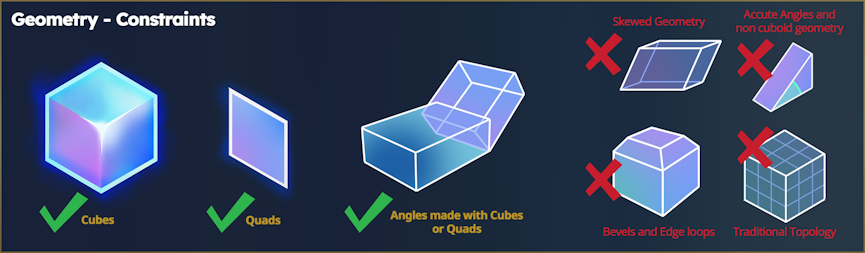
Hytale models are intentionally built using a limited set of geometry types. Rather than relying on traditional 3D topology, models are created using only cubes and flat quads. This means:
- Cubes and quads are supported
- Angles are created by stacking or rotating cubes and quads
- Traditional edge loops, bevels, and skewed geometry are avoided
These constraints keep models readable, easy to animate, and lightweight enough to appear in large numbers across the world. By limiting geometry complexity, Hytale ensures that even highly detailed scenes remain visually clear with high performance.
Triangle Count & Performance
Every single shape, simple or complex, contributes to the performance in Hytale. Each cube face is made up of two triangles, and their count becomes increasingly important as models appear more in-game.
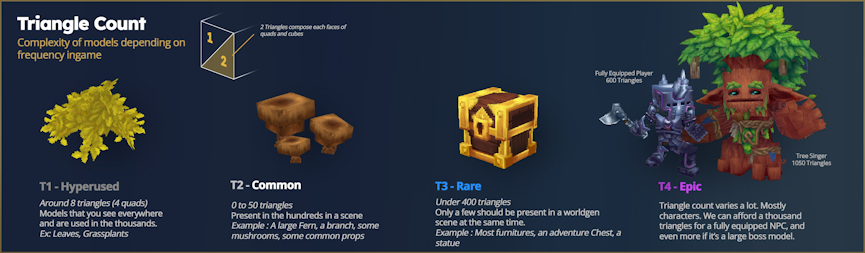
This balance allows the game to render dense, dynamic scenes while keeping performance stable. It’s important to understand this while you begin creating your own custom models.
Hytale Textures
The visual style of Hytale relies heavily on hand-painted textures, rather than complicated material systems. A model’s depth comes from painted shadows, highlights, and subtle color variation – all within the texture itself.
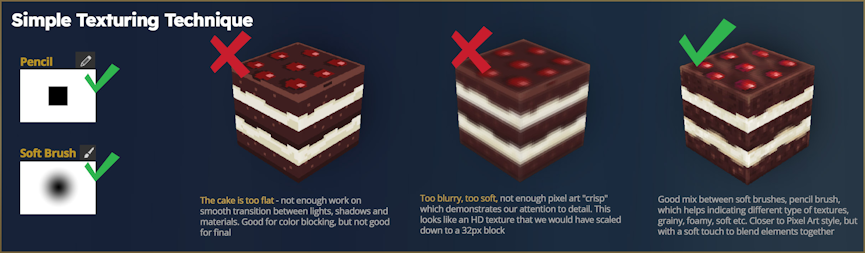
If you want to achieve the best results, the art team recommends using a mix of pencil brushes and soft brushes when painting textures:
- Pencil brushes: work well for sharp edges, color blocking, and fine detail
- Soft brushes: help smooth transitions, add volume, and create subtle shading
Combining these two brush types allows creators to produce a wide variety of surface styles, including grainy stone, foamy materials, soft fabric, organic surfaces, and stylized metals.
By treating each texture as a small illustration rather than a flat color map, creators can add depth and personality while staying within Hytale’s technical limits.
Visit the official Hytale Blog Post for more information about models and textures.
Customize Hytale with Blockbench
Hypixel Studios released these tools early for you to learn the workflow, experiment with ideas, and build polished assets. Whether you’re designing props, creatures, or cosmetics, understanding the Hytale Blockbench Plugin gives you the ability to create anything. Implement your creations and invite others to try them out, the power is yours 👏
Get creative, discover what’s possible, and bring bold ideas to life – get started today!





















