


Managing your server files should be quick, simple, and flexible. With this in mind, we’ve updated the FTP Panel – featuring several improvements to make everything easier for you! From more convenient upload options to better mobile usability, these changes are designed to streamline your workflow and help you manage your server more efficiently. Check them out in this Apex Hosting blog 👏
Upload & Download Changes
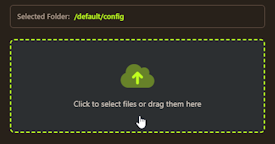
Rather than dragging and dropping files, you can instead use a direct upload button. This allows you to choose exactly what you want. However, you can still drag + drop files in the FTP panel.
There’s also a Wget feature where you can download files directly from URLs or FTPs to your server. This can be incredibly useful for large map downloads or transferring files from other servers.
Copy / Paste Feature
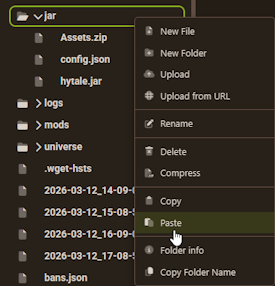
While you’re managing files on your server, you’re able to copy and paste files to other directories without having to manually move them. For example, this comes in handy when you have different server profiles – making it possible to quickly move files over. This is a simple, yet powerful feature that’s been added to the FTP panel.
New Mobile Layout
We know that managing your server while on the go is important, so we’ve updated the mobile layout. This streamlines the entire process, making it faster, easier, and better for you to access the FTP panel from a phone or tablet. This includes the file browser, context menus, and overall navigation.
Server Importer
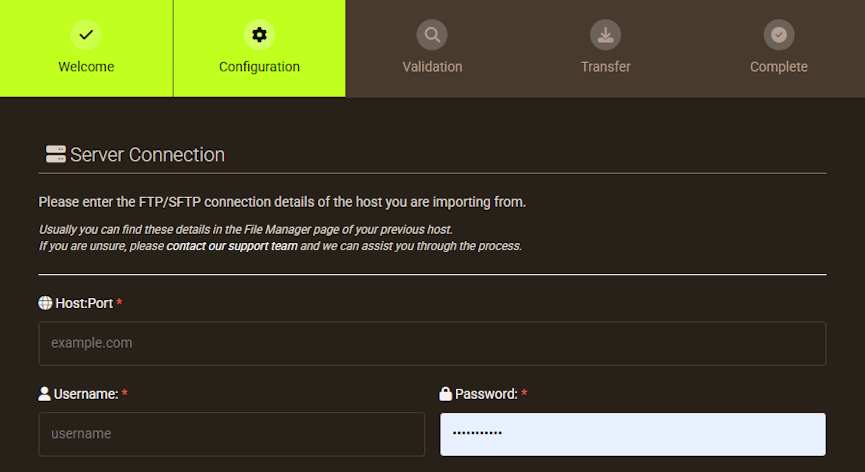
Outside of the FTP panel, we’ve also included the server importer feature once again on the main sidebar of your server panel. This enables you to transfer all files from a different host directly to your Apex server. You can always contact our Support Team to help you during this process!
Conclusion
These updates to the FTP panel are all about making server management smoother and more convenient. Whether you’re uploading new files, transferring content from another host, or managing your server on a mobile device, these improvements help save time and simplify the process. If you haven’t explored the updated FTP panel yet, now is a great time to take advantage of the new features available in your server control panel.





















