

As you wander around the Minecraft world, you can easily get lost. Whether you’re exploring vast cave networks or simply walking too far away from home, everyone has experienced being lost. That’s why many users want to install minimap mods, providing tools to help navigate the world. For instance, a map of the environment around you can reveal key locations, markers, and more. You can set a waypoint at your base and always know which direction to walk.
With this in mind, we’ll show you how to get a minimap in Minecraft 🔥
1. Install Forge or Fabric
Before adding minimaps to your game, you must install Forge or Fabric to Minecraft. This is required to load and use mods in-game. We encourage you to download Forge, but Fabric is also a good choice. It all depends on the type of minimap mod you want to download.
- Forge: Known for its extensive mod support and long history.
- Fabric: Lightweight and fast, great for newer versions and frequent updates.
2. Find Minimap Mods
With Forge or Fabric ready, it’s time to pick a minimap mod. Popular options include:
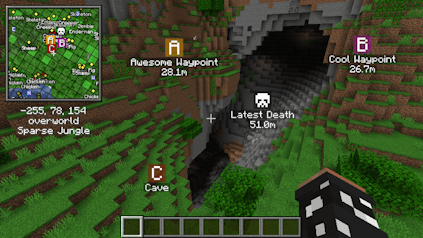
- Xaero’s Minimap – Clean design, smooth performance, and waypoint management.
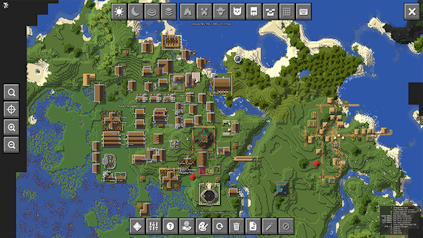
- JourneyMap – Interactive web map and detailed in-game minimap.
👉 Click here to find more mods
Ensure you’re downloading the right version of your minimap mod. This includes the game version and mod loader type. For instance, do not download Forge 1.20 if you’re using Fabric 1.21. Mismatched versions or mods using different loaders will not work – possibly crashing your game.
3. Install Minimap Mod
- Open your Minecraft launcher and click the “Installations” option near the top.

- Locate your previously installed modded profile, then press its “Folder” icon.
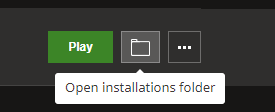
- In the newly opened window, find and enter the mods directory from the list.
- Proceed to drag and drop the downloaded files into this folder.
- You’re all done! Begin playing on the modded profile to use minimaps in Minecraft.
Note: If you are unable to locate the “mods” directory on your computer, then create it.
Instead of using the Minecraft launcher, you can also use CurseForge to create custom profiles to run mods. This is safer, easier, and overall more streamlined for Minecraft modding.
Minimaps in Minecraft
Getting turned around in Minecraft happens to everyone, whether you’re diving into endless cave networks or trekking far across biomes in search of rare resources. A minimap mod changes that by showing the terrain around you, pinpointing landmarks, and letting you set waypoints so your base is never out of reach. With a quick installation of mods like Xaero’s Minimap or JourneyMap, you’ll always know where you are and where you need to go, making every adventure smoother and far less stressful.





















