


Overview

Isn’t Vanilla just dogwater? That’s right, and it’s all because there aren’t enough golems. You spawn in with the focused goal of creating as many golems of varying types without a care for any other game mechanic, and you’re greeted with hours upon hours of filler. Mining, crafting, adventure, exploration, building, and a bunch of other useless aspects of gameplay all just to get two golems? Pathetic. But fret not, dear reader. Today, we’ve found one of the best mods ever, the Straw Golem mod for Forge and Fabric which does the altruistic act of adding a golem to the game! Today, we’ll be going over a general information guide on installing the mod on your Minecraft server and everything it includes. Let’s begin.
Summary
Straw Golem is a mod for Forge and Fabric made by CommodoreThrawn that acts as a spiritual successor for the original Straw Golem mod for modern versions of Minecraft. This mod adds a helpful (and awfully cute) little golem to do some of your farming for you.
This is an incredibly small yet quality mod, adding in no crafting recipes, biomes, items, or anything of the sort. It simply adds in the unique mob, some genuinely impressive AI attached, and that’s all! This awesome new mob, the Straw Golem, will help you by automating some of your farm…to a degree. Because of how small and needy it is, don’t expect massive levels of automation. We’ll get into all that, though.
Minecraft Straw Golem Mod Server Installation
Installing the Straw Golem mod on your Minecraft server is as easy as ever!
- Navigate to your Apex Server Panel

- Scroll to the
Game Filesection, then search for Fabric or Forge. Once chosen, restart the server so it can create the files it needs.
- Download your desired version of the Straw Golem mod. If you are using Fabric, also download the Fabric API.
- Stop your server, then navigate to the
FTP File Accesstab on the left.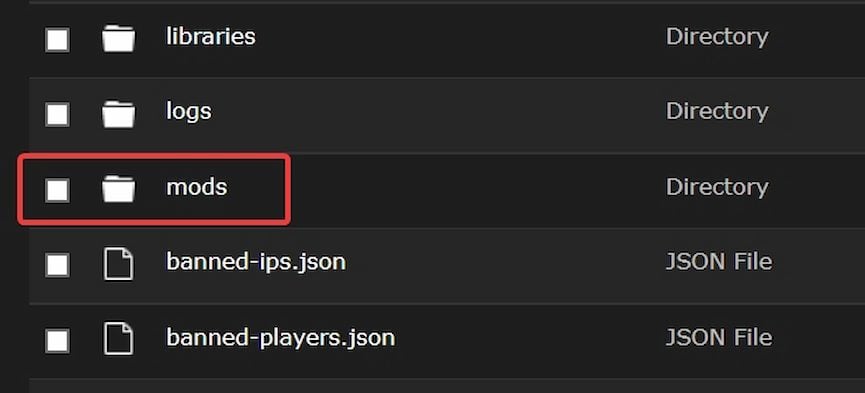
- Login, then open your
modsfolder.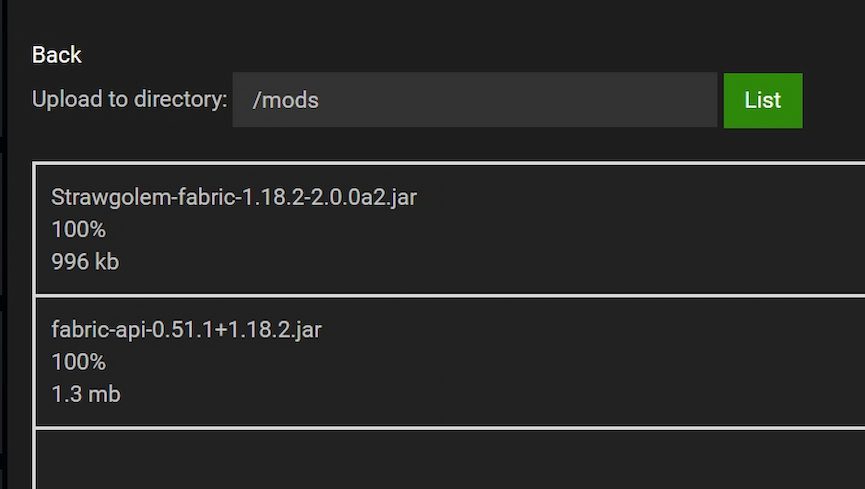
- Press
uploadin the top-left, then drag and drop the Straw Golem .jar file onto the page. Do the same with the Fabric API file if you are using Fabric.
Once these are fully uploaded 100% 1/1 files, navigate back to the main page of your control panel and restart the server. The mod will be loaded once the server is done restarting.
Installing Forge Mods Client-Side
- Download Forge from the Forge Download page.
- Follow our guide to install Forge on your client here

- Once installed, start the game and click on the new
Modsbutton on the main menu.
- Click on the
Open mods folderbutton, then drag the mod into your mods folder. - Restart the game and you will have access to the mod immediately
Installing Fabric Mods Client-Side

- Download Fabric from the Fabric Download page.
- Follow our guide to install Fabric on your client here
- Once installed, start the game and click on the “Options” button on the main menu.
- Click on the
Resource Packsoption, then on theOpen pack folderbutton at the bottom of the screen to open a new window. - From there, navigate up to the main folder for your game, then find and open the
modsfolder. - Copy the Straw Golem and Fabric API mod files into your mods folder.
- Restart the game to load them up!
Making a Straw Golem

This is probably the simplest, most intuitive part of the mod. Ever made an Iron Golem before? What about a Snow Golem? If you remember how you made them, then this should be pretty familiar. Simply place a Carved Pumpkin atop a Hay Bale, and then boom! You got yourself a lil’ Straw Golem at your side.
Functionality

The fun part! Now that you have your very own Straw Golem, you can put him to work in this lovely practice we call indentured servitude. Don’t worry, he likes it. But seriously, how does this little guy work? What does he even do?
Well, the Straw Golem automatically harvests and replants crops while simultaneously delivering the harvested crops into the nearest storage container. You can specify which container it delivers the harvest to by shift-right-clicking the golem and then the container with an empty hand. Also, Straw Golem supports modded crops and containers, stem-grown blocks like Pumpkins and Melons, and more! The configuration files can also be used to whitelist or blacklist particular crops.
Limitations
Unfortunately, our little golem friend is not as steadfast as his Iron brother. Straw Golems have a lifespan of 7 days, but this can be changed. The golem’s lifespan can be restored with wheat. 1 wheat = ¼ Minecraft day.

Straw Golems also get hungry. Feeding my workers? Preposterous. Anyway, the golems get hungry in 2 days, but this is also configurable. If they don’t get an apple in time, they will sit and pout until you give them one. Each apple gives them another day before they’re hungry again. Lastly, for some reason, Iron Golems often get curious and will quite literally pick up the Straw Golem for inspection.
Conclusion
That’s the mod! Straw Golem is a very simple yet endearing mod that adds what I believe to be a very Vanilla feeling golem to the game. With its lovely sound effects, animations, and small details like the Iron Golem inspecting it (lol) this is one of the best mods we’ve seen for its size. On top of those positives, it’s available for almost all recent versions on both Forge and Fabric. With that being said, I hope you enjoy your new little golem!
Useful Links
Modpack creation addon
How to change your server version
How to add mods to your server





















