


For those looking to only play with friends or trusted players, having a server password is crucial. In Farming Simulator 25, the process to set this up is extremely simple. All that’s required is a few clicks and minutes to configure. Once you’ve created a password, anyone with it can join – and those without it are denied access. In this Apex Hosting guide, we’ll show you how to change your Farming Simulator 25 server password.
How to Set a Server Password
- Head towards your Apex server panel, then login with your account credentials.
- Click “
Open Farming Simulator Interface” on the panel, while the server is online.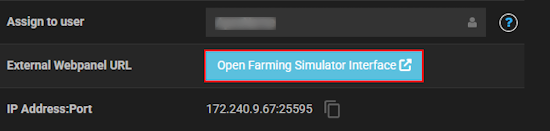
- Near the bottom, press “
Stop” and locate “Game Password” in the settings. - Proceed to enter your desired password in the text box.
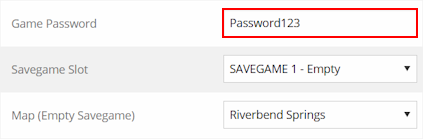
- When you’re finished, click “
Save” at the bottom and start the server.
We also recommend restarting the server from the Apex server panel.
FS25 – Password Protection
By default, there’s a password for your Farming Simulator 25 server. This can be quickly changed to something else, but only 16 characters can be used for it. Anything higher will not work on the server, so keep that in mind. We strongly suggest keeping it simple, but strong so no one else can guess it. Ultimately, it’s your choice! Share the password with friends and begin creating your agricultural empire in FS25 👏





















