

Having admin access on your Farming Simulator 25 server plays an essential role when managing players, using cheats, or editing options. It’s a great tool to make quick and easy changes to your server. However, the process to become an admin can be challenging for newcomers to the hosting scene. With this in mind, we’ve created this Apex Hosting guide to help you create an admin password and log in as one in-game.
Creating an Admin Password
- Head towards your Apex server panel, then login with your account credentials.
- Click “
Open Farming Simulator Interface” on the panel, while the server is online.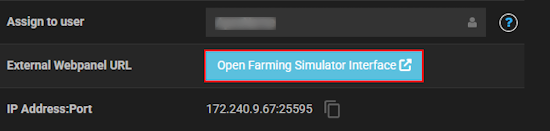
- Near the bottom, press “
Stop” and locate “Administrator Password” in the settings. - Proceed to type your desired password for admin in the text box.
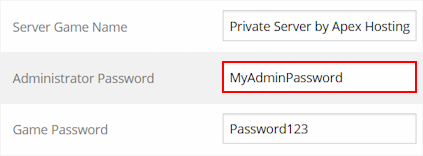
- When you’re finished, click “
Save” at the bottom and start the server.
We also recommend restarting the server from the Apex server panel.
Becoming an Admin In-game
- Launch Farming Simulator 25 and join your server from Multiplayer.
- While in-game, open the options and navigate to “
Farm Management“.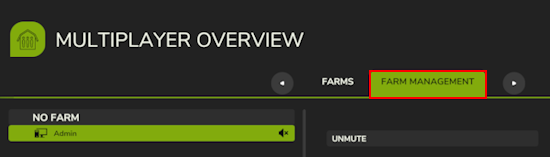
- Press the spacebar on your keyboard or click “
Log in as Admin” at the bottom.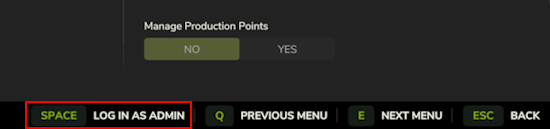
- Proceed to type your admin password in the text box, then press enter.
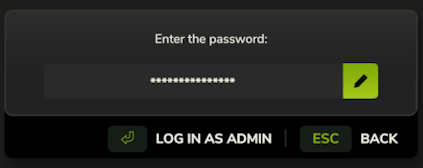
- If successful, you will see a confirmation popup and be able to use admin powers.
Admin Powers in FS25
After setting up your admin password and logging in as one on your FS25 server, you’re able to use admin features! These include special commands and actions that only administrators can execute in-game. Whether you’re removing farms, banning players, or adding money to your funds, becoming an admin is the first step towards customizing and controlling your Farming Simulator 25 server. Enjoy abusing your admin powers – or don’t, it is your server after all 😂





















