


Amplify your Farming Simulator 25 experience with mods! These can add new features and mechanics to your multiplayer server or singleplayer game. Whether you want new machines to work the fields or quality of life changes, you can install them. The exact process to do that can be challenging for newcomers to the hosting scene. With this in mind, we’ve created this Apex Hosting guide to show you how to install Farming Simulator 25 mods – easily.
Setting Up Mods
We will give a full breakdown of the mod installation for both the server and client. These instructions are fairly straightforward, but make sure to follow each step carefully. Installing mods can cause several kinds of problems, if done incorrectly. In the event you do come across problems or errors, review the “Common Issues” section below for solutions.
Server Instructions
- Head towards your Apex server panel, then login with your account credentials.
- Click “
Open Farming Simulator Interface” on the panel, while the server is online.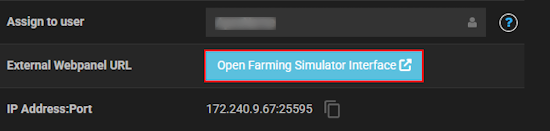
- Press “
Stop”, then proceed to click “Mods” at the top of your interface. - Under “
New Mods”, begin downloading mods or scroll down to upload your own.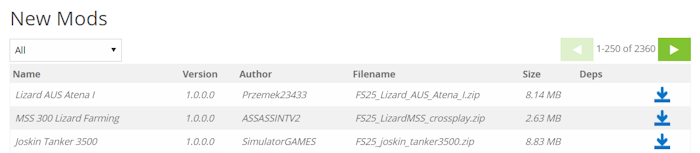
- Under “
Activate Mods” from the home, select the mods you want and press “Activate”.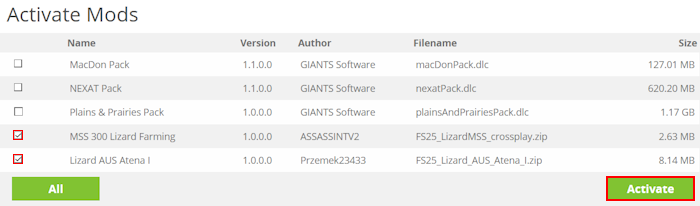
- Once activated, press “
Start” to load all the mods in the server.
You may also check the log files to confirm the mods are working.
Client Instructions
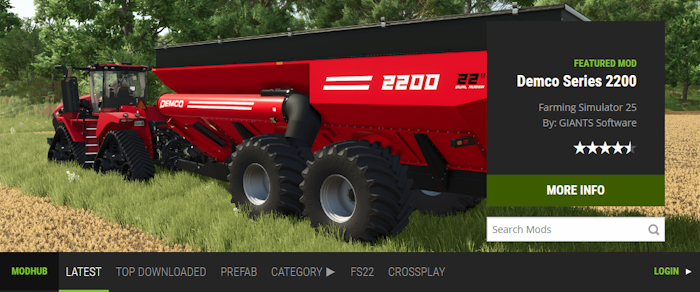
- Navigate to ModHub or a trusted third-party, then download the mods.
- On your computer, go to the following directory:
Windows –Documents\My Games\FarmingSimulator25\mods
MacOS –~/Library/Application Support/FarmingSimulator25/mods - Begin moving the downloaded
.zipmod files to this directory.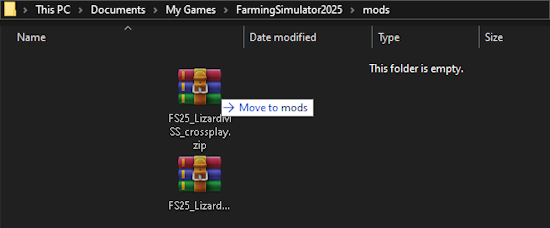
- Launch Farming Simulator 25, then enable the mods:
Main Menu > Career > Select Savegame > Mods/DLC - Start up the game and make sure the mods are working properly.
Common Issues
This error means that your local mods folder is missing one or more mods installed on the server. In other words, you need to ensure that all mods from the server are locally installed on your end. After resolving this issue, try to join the Farming Simulator server again.
If you installed all the right mods, then here are two reasons for this error: the file name or version is wrong. Check to see if the file names are matching exactly to the server’s mod list. Additionally, check the mod versions too – they need to match too. If both you and the server have the same identical mod file names / versions, then try to join again.
For players trying to set up mods on their client, this error means one or more mods have been extracted incorrectly. Make sure that you are placing the original .zip file in your local mods folder, without extraction. Otherwise, the file structure will continue to be invalid.
Double-check that you’ve placed the.zip files in your local mods folder. Otherwise, the mods will not be appearing in the game. Additionally, the mods should not be extracted and they all must be compatible with Farming Simulator 25. Here are the correct directories for the mods folder:
Windows directory: Documents\My Games\FarmingSimulator25\mods
MacOS directory: ~/Library/Application Support/FarmingSimulator25/mods
In cases where the server isn’t loading after a successful mod installation, then it is likely corrupted. Check the server logs from the Farming Simulator Interface to possibly locate errors. You can also begin removing recently added mods to see which one is problematic. Make sure that the mod is compatible and updated for the server to start up.
If the server comes online, but crashes right away – then two or more mods are conflicting. We encourage you to disable the mods one-by-one to narrow down the conflict. In some situations, you might be required to remove multiple mods for the server to run smoothly.
Farming Simulator 25 – Mods
Now that you have some mods installed, you can continue building the most powerful agricultural empire ever! Having extra features and mechanics only makes this adventure that much enjoyable. Invite friends on your modded Farming Simulator 25 server and have fun – or casually relax in your solo journey while growing crops. It’s now time, install some mods 😎





















