

Joining your Farming Simulator 25 server might not be that easy as you thought. You will need to create a name for your server, then locate it in-game to join. If you’re brand new to hosting, then don’t worry! We’ll walk you through all the steps to join a Farming Simulator 25 server in this Apex Hosting guide. Once you’re connected, invite friends and begin building that perfect agricultural empire you always wanted.
Creating a Server Name
- Head towards your Apex server panel, then login with your account credentials.
- Click “
Open Farming Simulator Interface” on the panel, while the server is online.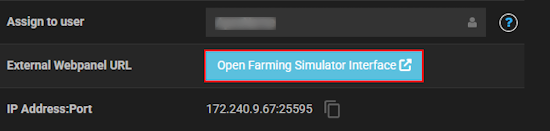
- Near the bottom, press “
Stop” and locate “Server Game Name” in the settings. - Proceed to type your desired name for the server in the text box.
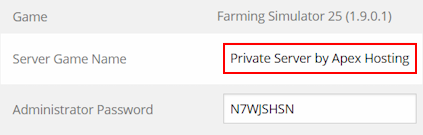
- When you’re finished, click “
Save” at the bottom and start the server.
We also recommend restarting the server from the Apex server panel.
Joining a Farming Simulator 25 Server
- Start up Farming Simulator 25 and click “
Multiplayer” from the main menu.
- Continue to click “
Join Game” to begin finding your server.
- Type your server name in the “
Game Name” field, then ensure the filters are correct.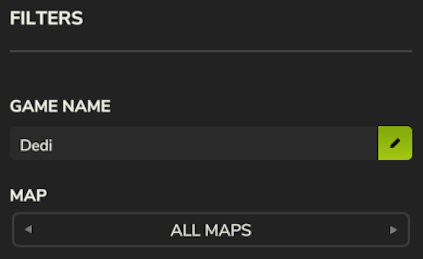
- Once you find the server, select it and enter a server password if you configured that.

Common Issues
In case you’re completely unable to locate the server, ensure you’re typing the correct “Game Name” in the filters. If this looks right, then double-check the other filters. These include the language, map, etc.. You can always use the Farming Simulator Interface as reference for these filters too. If nothing seems to be working, then you might need to redo the configuration if it wasn’t saved. Although, it could be a simple case that the server is offline.
After finding your server and you’re unable to connect, then it’s likely due to an invalid password. Inside of your Farming Simulator Interface, make sure to use or change the password shown in the settings. Afterwards, save and restart the server – then try again. If that failed, then you might need to contact our Support Team for extra assistance. If you’ve recently installed mods or changed other settings, this could be causing the problem.
FS25 Server Connection
Connecting to your Farming Simulator 25 server is easy, but minor configuration is required beforehand. All you need to do is create a server name, but maybe a password too – it’s your choice. Afterwards, you’re all set to find the server in-game via filters. Just make sure everything is correct, as even the wrong language can make it so your server does not show up. With all that said and done, we hope you enjoy your FS25 server! 🧑🌾





















