Water is one of the most frustrating obstacles when building in Minecraft. Whether you are draining an ocean monument, clearing a flooded cave, or cleaning up after a river runs through your build site, removing water requires dealing with every source block or it keeps coming back. This guide covers three reliable methods for getting rid of water in Minecraft: sponge blocks, WorldEdit commands, and the manual block-placement approach. Each method works in different situations, so you can pick whichever fits your server setup or playstyle.
Water Removal Methods

The method that works best for you depends on which edition of Minecraft you are playing and what tools are available on your server. Java Edition has the widest range of options, including plugins and WorldEdit. Bedrock Edition supports sponges and the manual approach. If you want access to all three methods across both editions, running a Java and Bedrock crossplay server gives you the most flexibility. The subsections below break down each method so you can quickly decide which one to use.
Method 1: Sponge Blocks
Starting off with the first method, using sponge blocks is a universal way to remove water in Minecraft. These are only found in Ocean Monuments and slaying Elder Guardian mobs, making them a bit troublesome to obtain. All water within its range will be instantly deleted upon placing down this block. However, you and other players alike will need several sponges to effectively remove all liquid.

Once enough water is absorbed, the block must be dried out by “smelting” it in a furnace. This means they’re reusable and will help you clear out all liquids for your structures. If you’re having trouble locating sponges, consider enabling cheats to easily get them.
Method 2: Plugins and Mods

Continuing with our second method, players can choose to install plugins or mods to quickly remove water in Minecraft. For example, WorldEdit can be used for Bukkit, Forge, or Fabric to achieve this goal by running the //removenear water command while close to liquids. This means you can use it as a plugin or mod to get rid of water, which will instantly delete its source blocks. Players with this can forget about sponges and instead forcibly remove liquids in their world.
However, this is technically considered cheating if you’re trying to remain legit or in a vanilla gameplay session. Keep in mind that there are several other addons out there for you to use for this task. If you are running a Paper Minecraft server, plugins like WorldEdit are easy to install and work well for large-scale water removal.
Method 3: Manual Block Placement
If you’re wanting to avoid installing extra addons, using cheats, or sponges, then consider our third method. This is the classic way of getting rid of water in Minecraft, meaning you simply place blocks where the liquid’s source is located. Afterward, break it and the water will be gone. However, you have to do this for everything so none of it returns. The key is targeting source blocks rather than flowing water: removing a source stops the flow, while removing flowing water blocks leaves the source in place and the water returns. This method takes patience but requires no special tools or server permissions.
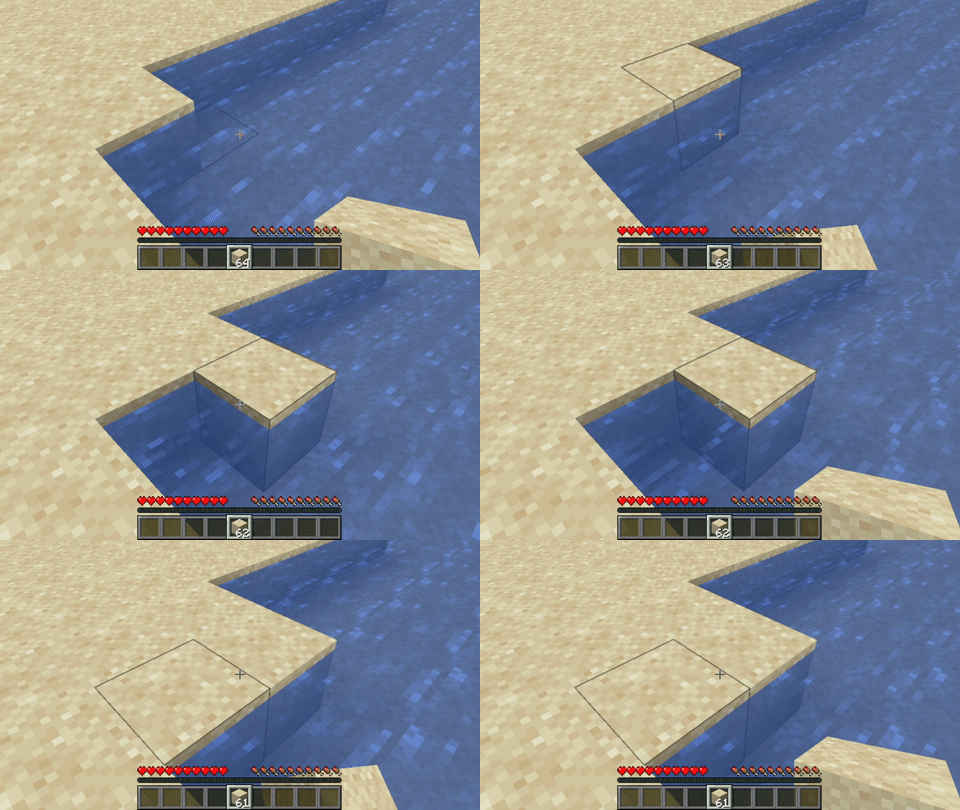
Out of the three methods, this one is best suited when no addons are available and cheats are off. For smaller water patches or quick fixes during a build session, it gets the job done without any setup. If you find yourself needing to manage water frequently, consider using WorldEdit or sponges for larger areas. You can also look into loading WorldEdit schematics for complex build projects where water removal is part of a larger workflow.