


Overview
You found the perfect Minecraft server. Waterfalls near spawn, a village within walking distance, terrain that looks hand-picked for survival. Now you want the seed to locate structures offline or recreate the world in singleplayer, but typing /seed returns nothing because you are not a server operator. Two Fabric mods let you find a Minecraft server seed without OP access, and both support the latest Java Edition versions including 26.1.

How Server Seeds Work
Every Minecraft world generates from a single number called a seed. That number controls terrain shape, biome positions, structure placement, and ore distribution across the entire map. On multiplayer servers, only operators and players with command access can run /seed to reveal it.
If you do not have those permissions, two client-side mods offer a workaround for Java Edition. One downloads a copy of the server world to your machine. The other cracks the seed by analyzing the positions of in-game structures. Neither method needs server-side access or special permissions from the owner.
Java Edition Methods
Simple World Downloader
The original World Downloader mod by Pokechu22 has not been updated since August 2021 and only supports Minecraft versions up to 1.16.4. Its successor is Simple World Downloader on Modrinth, a Fabric-only mod with active development. The latest release (version 1.4.0) supports Minecraft 26.1 and was last updated in February 2026.
The mod adds a download button to your pause menu. Activating it tells the mod to save every chunk you load while walking around the server. Only the areas you physically visit get captured, so explore the regions you care about before stopping the download.

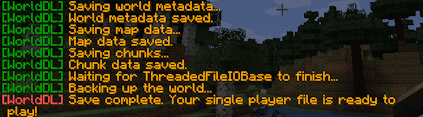
When the download finishes, a confirmation message appears in chat. The world files save to a downloaded_world folder inside your .minecraft directory. Copy that folder into your saves directory, load the world in singleplayer, open it to LAN with cheats enabled, and run /seed.
The download only captures chunks you have loaded. Anything you have not walked through will be missing from the copy. Large areas take time to cover, and the resulting file can grow to several hundred megabytes if you wander extensively. But for seed finding alone, you only need a small downloaded area; the seed number applies to the entire world regardless of how much you saved locally.
SeedcrackerX
If downloading world files feels like more work than necessary, SeedcrackerX takes a mathematical approach. This Fabric mod (version 2.16.0, updated March 2026) supports Minecraft 26.1 and reverse-engineers the seed from the positions of naturally generated structures.

Walk over 5 or 6 different structure types to give the mod enough data points. Dungeons, desert temples, igloos, witch huts, and end pillars all work. SeedcrackerX logs the coordinates of each structure, runs them against Minecraft’s world generation algorithm, and narrows down possible seeds until only one matches. The result appears directly in your chat. No world download, no file management.
The reason this works is that Minecraft’s generation is deterministic. Given the same seed, the same structures always appear at the same coordinates. Mapping enough real positions makes the reverse calculation possible. Dungeons tend to be the easiest data points to collect because they generate frequently underground and you stumble across them while mining. Desert temples and witch huts also help because their positions are tightly constrained by biome placement. The more variety you feed the mod, the faster it locks onto a single result.
SeedcrackerX runs its calculations in the background as you explore. You do not need to stop and trigger anything manually. When enough structures match a single seed candidate, the mod prints the number in chat automatically. On busy servers where you cannot spend hours exploring, even a focused trip through a few biomes can produce a result if you happen to cross the right mix of structures.
The mod also includes a configurable xray feature meant for locating structures faster. Most server anticheats flag xray immediately, so leave that feature off unless the server explicitly allows it.
What to Do with Your Seed
Once you have the seed number, plug it into the Chunkbase Seed Map to see every structure and biome across the full world. You can find specific biomes like mushroom islands or cherry groves, pinpoint mansions and ocean monuments, and plan routes before logging back in. Chunkbase supports current Minecraft versions and updates its maps regularly. The site also offers specialized apps for locating slime chunks, nether fortresses, and strongholds if you need to find a particular structure without wandering the map blind.
Pair the seed map with the ability to show coordinates in-game, and you can walk directly to whatever the map reveals. You can also paste the seed into a new singleplayer world for your own copy of the terrain. Structures and ores will generate in identical positions, though player-built content from the server will not carry over.
Bedrock Edition Limitations
Bedrock Edition does not support client-side mods the way Java does. The game runs on a closed platform architecture across consoles, mobile devices, and Windows 10/11, and Microsoft does not expose the same modding hooks that Java Edition offers through Fabric. No working equivalent of Simple World Downloader or SeedcrackerX exists for Bedrock players on any platform. If you play on a Bedrock Edition server, the only reliable method is asking someone with operator access to run /seed and share the result.
Some third-party websites claim to extract Bedrock seeds from uploaded world data, but none have been independently verified as accurate or safe to use. Stick to asking the server owner directly.
Realm Seeds
Minecraft Realms restrict the /seed command to the Realm owner exclusively. Even players given operator status on a Realm cannot run it. If you want a Realm’s seed, the owner has to share it with you directly.
Risks and Server Rules
Both seed-finding methods are allowed by Minecraft’s terms of service, but individual servers set their own policies. A few things to consider before using either mod:
- Server owners may treat seed extraction as cheating and ban you for it
- Downloaded worlds can reveal hidden base locations, which is unfair play on PvP and faction servers
- SeedcrackerX’s xray feature triggers most anticheats when enabled
- Mods from unofficial sources could contain malware; only download from Modrinth and GitHub
So check the server’s rules before running either mod. Many survival and creative servers are fine with seed finding, but competitive servers typically are not. And if you do get the seed, think twice before sharing it publicly. Other players on the server may not appreciate having their base locations exposed through a seed map.
Conclusion
Without OP access, the /seed command is locked on multiplayer servers. Simple World Downloader and SeedcrackerX both work on the latest Java Edition versions through Fabric, giving you two options depending on whether you want a full world copy or just the seed number. Bedrock and Realms players have fewer choices and will need to request the seed from their server or Realm owner. Once you have the number, tools like Chunkbase open up the full map for planning your next move.






















