


Before anyone can join your Minecraft server, they need the IP address. Where to find it depends entirely on how you’re running the server. Apex Hosting customers pull it from the control panel in seconds. PC hosts run a quick command. Console players face a different situation, and this guide covers all three setups.
What Is a Minecraft Server IP Address?
Every Minecraft server has a network address that players use to connect. This address comes in two forms: a raw IP number (like 123.45.67.89:25565) and a readable subdomain (like yourserver.apexmc.co). Either one works in the Minecraft multiplayer menu. Hosting providers assign a dedicated address; self-hosted servers use your machine’s local or public IP.
Hosted Dedicated Servers

If you rent a server through a hosting provider like Apex Hosting, the IP address is on the main panel page. No commands, no digging. Keep in mind that hosting a Minecraft server with us is required beforehand, so visit our Pricing Area if you haven’t already purchased one.
- Head towards your Apex server panel after logging in with your credentials.
- Once there, locate the
IP Address:Portsection near the top. - Copy or take note of these values, along with your Subdomain.
The Subdomain is a readable alternative to the numeric IP. Both connect players to the same server. If you want to set one up, Apex offers a guide on creating a custom subdomain for your Minecraft server.
Self-Hosted PC Servers

Running a Minecraft server from your own computer means the IP address is on your machine. If you want a full walkthrough of setting up a self-hosted server first, see the guide on how to make a Minecraft server.
Windows
- On your keyboard, press the Windows Key + R at the same time to open the Run app.
- Proceed to type “cmd” in the text box, then click the OK button down below.
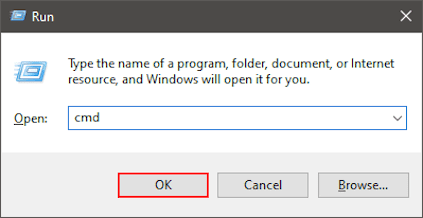
- In the console prompt, enter the ipconfig /all command.
- Locate “Default Gateway” or “IPv4 Address”, then copy or take note of these values.

Note: This varies depending on how you’re connected to the internet.
macOS
Navigate to the Network area from your System Settings and click on your respective connection. Afterward, press the Details button and copy down the IP Address values.
Alternatively, using the terminal allows you to enter ipconfig getifaddr en0 or ipconfig getifaddr en1 to achieve the same result. The first command is for WiFi connections, while the second is only for wired types.
Local IP vs. Public IP: Which One Do You Need?
The address from ipconfig is your local IP. It only works for players on the same home network as the server machine. If a friend outside your home tries to join with that address, the connection will fail.
Players outside your home network need your public IP. Search “what is my IP” in any browser — the result at the top of the page is your public IP.
For players outside your home to reach a self-hosted server, you also need port forwarding on your router. This tells your router to send incoming traffic on port 25565 (the default Minecraft Java Edition port) to the machine running the server. The exact steps depend on your router model.
Apex Hosting customers skip all of this. A hosted server comes with a dedicated address that works for anyone on any network.
Servers on Consoles

Minecraft on Xbox, PlayStation, and Nintendo Switch runs Bedrock Edition, which limits console players to a curated list of Featured Servers. Unlike PC, console players cannot type a custom IP address into a multiplayer menu to join a private server.
Apex has dedicated guides that walk through the DNS-based workaround for each platform. Xbox and Nintendo Switch players should follow the steps to add servers on Xbox and Switch. PlayStation players should use the guide to join a Bedrock server on PlayStation.
Frequently Asked Questions
Open Minecraft and select Multiplayer, then click Add Server. Paste your IP address into the Server Address field, give the server a name, and click Done. The server appears in your list and you can connect directly from there. For full step-by-step instructions, see the guide on how to join a Minecraft server on PC.
If your friends are outside your home network and you are running a self-hosted server, they need your public IP, not your local one. Confirm that port 25565 is forwarded on your router. If you are using an Apex Hosting server, check that you shared the full address including the port shown in the panel.
Apex Hosting server addresses stay fixed as long as your plan and server location remain the same. For self-hosted servers on a home connection, your public IP can change when your router reconnects. A free Dynamic DNS service gives your server a consistent hostname that updates automatically when the IP changes.
Public servers list their connection addresses on their websites and community Discord servers. Server listing sites such as Planet Minecraft also display IPs for thousands of public servers. For a private server, ask the owner directly.
Conclusion
Finding your Minecraft server IP address takes under a minute. Apex Hosting customers find it on the main panel page. PC hosts run ipconfig on Windows or check System Settings on macOS. Console players on Bedrock Edition use the DNS-based workaround covered in the platform-specific guides linked above.






















