


Can You Join Custom Servers on PS5 or PS4?
Sony blocks direct IP entry in Minecraft on PlayStation. There is no option in the game menu to type a server address; only Realms and the built-in Featured Servers appear. That restriction applies to both PS4 and PS5, including the native PS5 version released in October 2024 as a free upgrade from PS4.
You can still connect to any Bedrock-compatible host using one of three methods: a mobile proxy app, the BedrockConnect DNS method, or a PC command-line tool for advanced users. This guide covers all three.
One note if your server uses GeyserMC to support Bedrock crossplay: Bedrock players can join without any extra plugins on your end. Floodgate is only required on top of GeyserMC when your Bedrock players do not have a Java Edition account. Xbox and Switch players face similar limitations and can use the same methods; see the Xbox and Switch guide for platform-specific steps.
Finding Your Server Address

Before connecting, get your server’s IP address and port from the Apex Hosting control panel. Scroll to the IP Address section. The port is the number that follows the colon. In the example above, 123.456.78.90:25695 means the port is 25695.
Keep both values ready before starting any of the methods below.
How to Use BedrockTogether on PS5 (Step-by-Step)
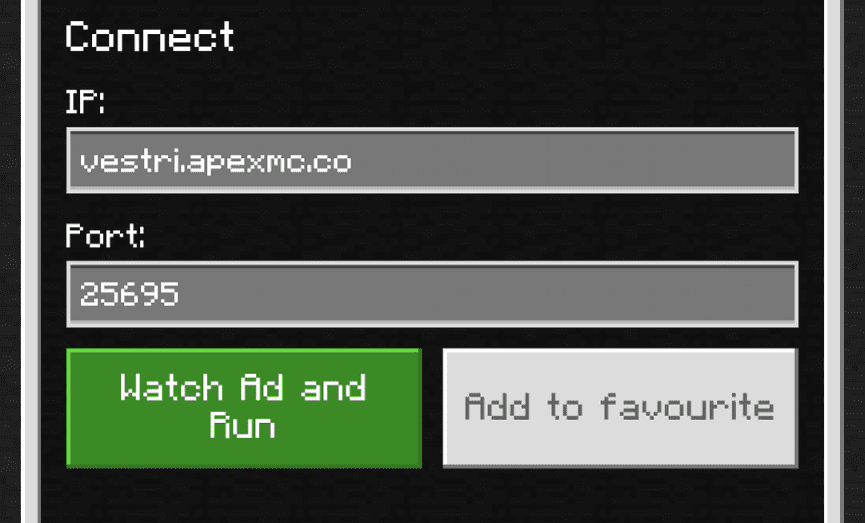
BedrockTogether (version 1.26.0, updated February 2026) is the most widely used app for connecting PlayStation to custom Bedrock games. Download it free from Google Play or the Apple App Store. A paid option, BedrockTogether Pro, removes ads if you prefer an uninterrupted session.
- Download BedrockTogether from Google Play or the App Store.
- Open the app, then type in your server’s IP Address in the IP: box.
- Type in your server’s port in the Port: box.
- Click on the green Watch Ad and Run button beneath the address boxes.
- Wait for the ad to finish playing, then click on the X at the top right to close out of it.
- Open Minecraft and click on the Play button on the main page.
- Navigate to the Friends tab and locate the LAN Games section.
- When the BedrockTogether game appears, click on it to join your server.
Keep the app running the whole time you play (closing it ends the connection). The LAN game can take one to two minutes to appear after you start the app, so launch BedrockTogether before opening Minecraft on your PlayStation. Both your phone and PlayStation must be on the same Wi-Fi network.
Joining Without a Phone: BedrockConnect (DNS Method)
BedrockConnect offers a different approach that requires no phone at all. It works by pointing your PlayStation’s DNS settings to a community-run address that intercepts the Featured Servers screen and replaces it with a menu where you can enter any custom IP. Many players prefer this once it is set up, since the proxy runs entirely through the console.
- On your PlayStation, go to Settings, then Network, then Set Up Internet Connection.
- Choose Custom setup and select your connection type (Wi-Fi or LAN cable).
- At the DNS Settings screen, select Manual.
- Set Primary DNS to 104.238.130.180. Use 8.8.8.8 as the Secondary DNS.
- Complete the remaining steps and save.
- Open Minecraft, go to Play, then navigate to the Servers tab.
- Instead of the usual Featured Servers list, you will see a BedrockConnect menu.
- Enter your server’s IP address and port to connect.
If the primary address does not work, check the BedrockConnect GitHub page for alternate DNS addresses. The community-maintained list updates over time. To restore normal PlayStation network function at any time, switch your DNS settings back to Automatic.
Alternative Apps for Joining Bedrock Servers on PS5
BedrockTogether is the simplest option, but three others work if you need an alternative. Apex Hosting is not affiliated with any of these tools and cannot offer technical support for them.
Phantom (Windows and Mac)
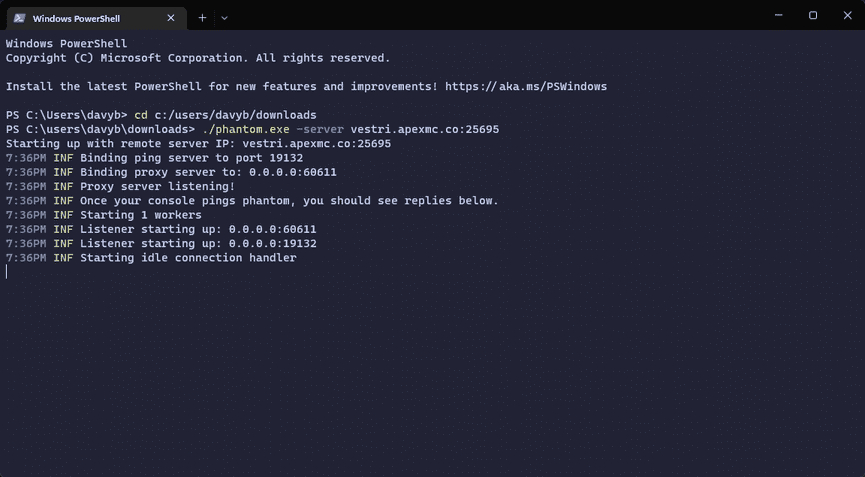
Phantom is a command-line tool for Windows and Mac that creates a LAN broadcast your PlayStation can detect. It often produces a more stable connection than phone-based apps. The trade-off: you run it through Command Prompt on Windows (not PowerShell) or Terminal on Mac, which makes it best suited to players comfortable with command-line tools.
Note: Phantom’s last compiled binary release was December 2021 (version 0.5.4 pre-release). The project received maintenance commits in 2024 but no new binary has been published since. Check the Phantom GitHub releases page for any updates before downloading.
To use Phantom:
- Download the correct binary for your operating system from the Phantom GitHub releases page.
- Open Command Prompt (Windows) or Terminal (Mac).
- Run the phantom command with your server address and port as arguments.
- Your PlayStation will pick up the LAN broadcast in the Friends tab within a minute or two.
MC LAN Proxy (Android)

MC LAN Proxy works the same way as BedrockTogether: open the app, enter your server’s IP and port, tap the connect button, then join from the Friends tab in Minecraft. It is Android-only. The free version shows ads; a paid upgrade removes them.
MC Server Connector (Android and iOS)
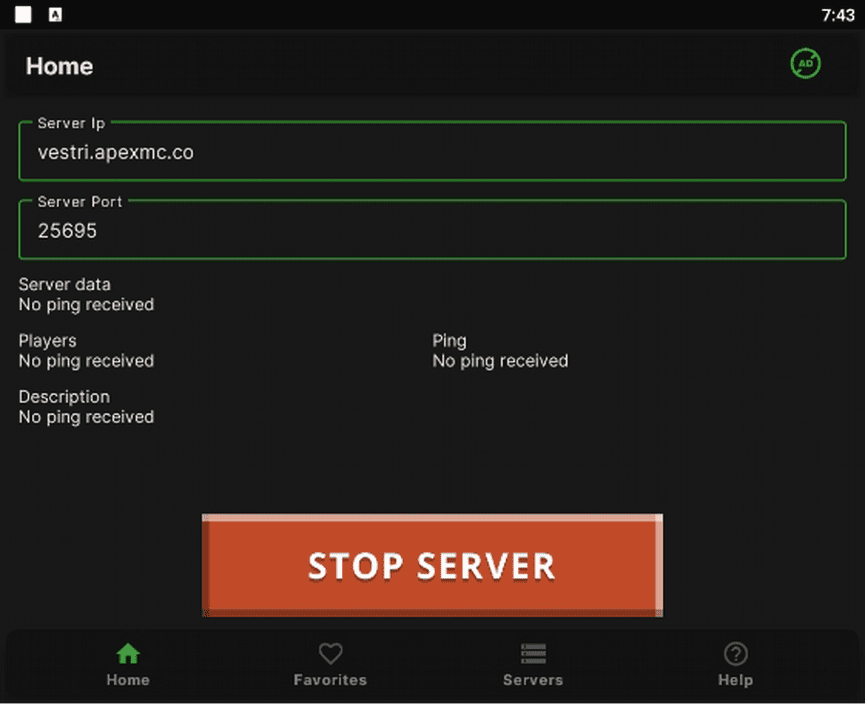
MC Server Connector (version 2.3, updated January 2025) works on both Android and iOS. Enter your address and port, tap the large green button at the bottom of the screen, watch the 30-second ad, then join from the Friends tab. The process is the same as BedrockTogether.
Troubleshooting MC Server Connector: If the LAN game does not appear in your Friends tab after two minutes, force-close and reopen the app, then confirm both devices are on the same Wi-Fi network. If you keep seeing an “unable to connect to world” error, double-check that you entered the port separately. Copying only the IP address without the port number is a common mistake.
Joining Specific Servers on PS5 (Donut SMP and More)
The methods above work with any Bedrock-compatible game. Here is how to connect to a commonly searched community and any other host.
Donut SMP
Donut SMP runs Java Edition with GeyserMC, so Bedrock players can join directly. Use donutsmp.net as the address and 19132 as the port. Enter those values into BedrockTogether or the BedrockConnect menu. Do not use the Java Edition address, which uses a different port. Check the official Donut SMP website or Discord for the latest connection details, as addresses can change.
Any Other Host
For any other game, confirm with the host or their website that Bedrock connections are supported (the host needs Bedrock Edition or GeyserMC). Get the correct IP and Bedrock port, then use the method from this guide that works best for your setup. If you are looking to host your own Bedrock game, Apex Hosting’s Bedrock servers support cross-platform play out of the box.
Common Issues Joining Bedrock Servers on PS5
This most often happens because the IP address or port is incorrect. Double-check both values, restart Minecraft on your PlayStation, and try again. If you are still getting this error, restart the game host and attempt to join again. If you are running a Java game with GeyserMC and your Bedrock players do not have a Java Edition account, install Floodgate as well.
Make sure your mobile device is on the same Wi-Fi network as your PlayStation. The LAN game will not appear if they are on different networks. If it still does not work, restart both devices or try one of the alternative apps listed above. Note that running these apps through an emulator like BlueStacks will not work.
This usually happens when the game host has not been updated or is running an older version. If you are running a Bedrock server, restart it so it will update to the latest version. If the game runs Java with GeyserMC, try installing ViaVersion to allow players on newer versions to connect.
This most often happens when the host receives too many connection attempts at once. Wait a few minutes before trying to join again. If the issue continues, restarting the game should clear it.
Frequently Asked Questions
How do I join a Minecraft server on PlayStation?
PlayStation does not allow direct IP entry, but you can join any Bedrock-compatible host using a mobile proxy app like BedrockTogether. Enter your server’s IP and port in the app, start the proxy, then join via the LAN Games section in your Friends tab on PS4 or PS5. The BedrockConnect DNS method also works without a phone.
Can you join custom servers on PS5 in 2026?
Yes. While Sony still does not allow direct IP entry in the game menu on PS5, proxy apps like BedrockTogether and the BedrockConnect DNS method both work. The PS5 native version (released October 2024 as a free upgrade from PS4) has the same restrictions and the same workarounds.
Why can’t I see my Minecraft server on my PS5 friends list?
Your mobile device and PS5 must be on the same Wi-Fi network. Also confirm that the proxy app (like BedrockTogether) is still running (closing it drops the connection). It may take one to two minutes for the LAN game to appear after you start the app.
What is the best app to join Minecraft servers on PlayStation?
BedrockTogether is the most recommended option for both Android and iOS. Alternatives include MC Server Connector and MC LAN Proxy. If you would rather not use a phone at all, the BedrockConnect DNS method works entirely through your console’s network settings.
How do I find my Apex Hosting server address and port?
Log into your Apex Hosting control panel. Your IP address and port are listed in the IP Address section. The port is the number after the colon (for example, 123.456.78.90:25695 means port 25695).
What is BedrockConnect and how do I use it on PS5?
BedrockConnect is a community project that lets you set your PlayStation’s DNS to a custom address, which redirects the Featured Servers screen so you can enter any server IP. Change your Primary DNS to 104.238.130.180 in your PlayStation network settings, then open Minecraft and navigate to the Servers tab to add your address.
Can I join a Donut SMP server from PS5?
Yes. Donut SMP supports Bedrock players through GeyserMC. Use donutsmp.net as the address and 19132 as the port in BedrockTogether or BedrockConnect. Check the Donut SMP website for the latest connection details before joining.






















