

Do you want full control over your Hytale world? Whether you need to ban a troublemaker, switch gamemodes, or manage server settings, you need the right permissions. Without them, you are just another player.
Admin privileges unlock every tool the game has to offer. In this Apex Hosting guide, we’ll show you how to grant yourself and others admin access on your Hytale server.
Becoming an Admin (OP) on Your Hytale Server
- Join your Hytale server with the account you want to become admin.
- In your Apex Panel, select Console from the left menu.
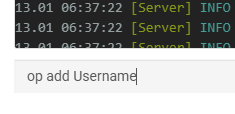
- Proceed to enter
op add [username]in the command prompt. - Replace
[username]with your Hytale username and click Send. - If successful, you will see the "[username] is now an operator!" confirmation message.
For Singleplayer: Use /op self in-chat to become an admin on your own world.
Adding Offline Players
In Hytale, every account has a UUID (Universally Unique Identifier). This can be used to make someone admin if they’re not connected to the server. Here’s an example of a UUID: 34ef6c2d-13be-3de0-ba01-6bca1d9af96b. You can locate UUIDs by using online services or looking through the hytale/Server/universe/players directory via the File Browser.
- Join your Hytale server with the account you want to become admin.
- In your Apex Panel, select Console from the left menu.
- Proceed to enter
op add [UUID]in the command prompt. - If successful, you will see the "[UUID] is now an operator!" confirmation message.

Hytale Permissions List
The file that manages all admins / operators or other permission groups is found in the Config Files section in your Apex Panel. This allows you to access and edit the configuration file, if required. We recommend avoiding editing its contents unless you know what you’re doing so no errors occur.
Stop the server beforehand, if making changes to the permissions.json file.
- In your Apex Hosting panel, click Config Files in the left menu.
- In this page, click on Hytale Server Permissions.
- In this section you’ll see players and their assigned permission levels.

Important: Only edit this file if you know what you’re doing!
Admin (OP) Commands List
Once you are an admin, you can manage other staff members directly. Here are the essential commands you will need.
| Command | Description |
op add [username / UUID] |
Add a player as admin in the server. |
op remove [username / UUID] |
Remove a player as admin in the server. |
op self |
Add yourself as admin, while connected to the server. |
Start Managing Your Server
You now have the power to control every aspect of your Hytale server. From moderation to creative building, these permissions are the key to a smooth experience. Get out there and build the community you’ve always wanted!





















