


Take full control of the atmosphere in Hytale by mastering the passage of time on your server. Whether you want endless daylight for a massive construction project or a permanent midnight for a spooky survival challenge, the clock is yours to command. In this Apex Hosting guide, we’ll show you how to take charge of the sun and moon using simple in-game tools or by editing the configuration files. ☀️🌑
Mastering the Hytale Day/Night Cycle with Commands
Commands are the best way to make instant changes without restarting your world. Use these essential Hytale server commands to manipulate time on the fly while logged in with admin permissions. 👇
| Command | Description |
|---|---|
/time set [value] |
Sets the clock to a specific time. Use values like midday, dusk, or dawn. |
/time dilation [multiplier] |
Adjusts the speed of the day/night cycle. Use multipliers like 0.5 to slow time or 2.0 to speed it up. |
/time pause |
Stops the world clock entirely at its current position. |
/time query |
Displays the current in-game time and total day count. |
If you want to explore more options or learn about every toggle available, type /time –help in-game to see the full list of parameters. These commands give you total flexibility to change the mood of your server in seconds. 👏
Modifying the Config File
Editing the configuration file creates a permanent, hardcoded schedule for your world. This ensures your custom durations remain active even after a server reboot.
Locating the Config
- Stop your server completely before touching any files to prevent data corruption. ⚠️

- Open the FTP File Access panel on the left side of your Apex dashboard.
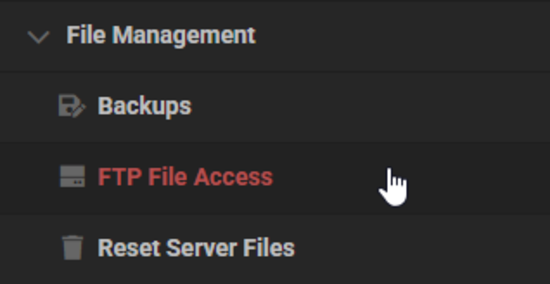
- Find and edit the config.json file located in your server’s world directory.
(example path:default/universe/worlds/[world_name]/config.json)
Changing Duration Values
- Double-click the file to open the advanced editor directly in your browser.
- Locate the lines labeled DaytimeDurationSeconds and NighttimeDurationSeconds.
⚠️ If these lines are missing, you must manually add them underneath the “GameplayConfig”: section.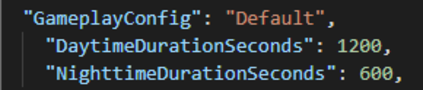
- Enter your desired duration for each cycle in seconds (e.g., 1200 for 20 minutes).
- Save the changes and restart your server to apply the new world schedule.
Bending the Clock to Your Will
Mastering Orbis’ clock is just the beginning of your journey as a server owner. With full control over day and night, you can set the stage for epic events and unique gameplay styles that keep your players coming back for more. 🔥
Helpful Resources
- How to Change the Death Penalty on a Hytale Server
- How to Enable PVP on a Hytale Server
- How to Become Admin on a Hytale Server
- How to Install Hytale Server Mods, Plugins & Assets
👉 For more Hytale guides, click here!





















