

Do you hate losing all your hard-earned gear when you die? Or maybe you want to ramp up the difficulty for a true hardcore experience? Hytale allows you to customize exactly what happens when you respawn. Whether you want to keep your inventory or drop everything, the choice is yours. In this Apex Hosting guide, we will show you how to configure the death penalty settings on your server. 🔥
Available Death Penalty Settings
Before jumping into the config files, you need to understand how the settings work. The config.json allows you to change the loss mode and even set specific percentages for item loss.
- ItemsLossMode: Controls the overall behavior. Options are None (Keep Inventory), All (Drop Everything), or Configured (Use percentage settings).
- ItemsAmountLossPercentage: If mode is “Configured,” this determines what % of your stack you lose (e.g., 50.0 is half).
- ItemsDurabilityLossPercentage: Determines how much durability your items lose upon death.
How to Change the Death Penalty
Changing this setting requires a quick edit to your world’s configuration file.
Accessing the Config File
- Head to your Apex Server Panel and Stop the server.
- Click
FTP File Accesson the left-hand side and log in.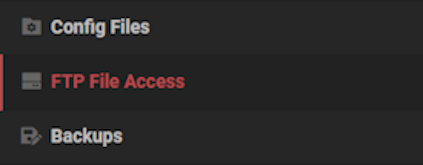
- Navigate through the folders:
universe > worlds > [YourWorldName]and double-click theconfig.jsonfile toEdit.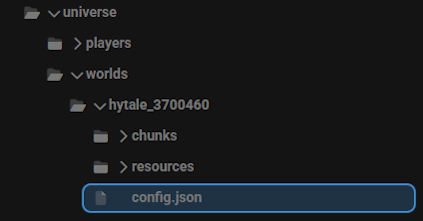
Editing the Settings
- Inside the file, use the search function (Ctrl+F) or find this exact line:
"GameplayConfig": "Default", - Place your cursor at the end of that line and press
Enterto create a new empty line. - Paste the following code block into that empty space:
"Death": {
   "RespawnController": {
     "Type": "HomeOrSpawnPoint"
   },
   "ItemsLossMode": "Configured",
   "ItemsAmountLossPercentage": 50.0,
   "ItemsDurabilityLossPercentage": 10.0
 },
This is what is should look like: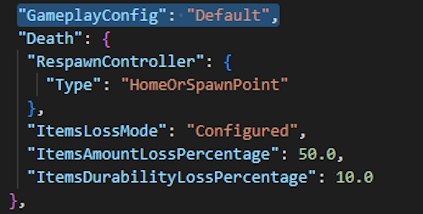
- Adjust the "ItemsLossMode" to your preference ("None", "All", or "Configured").
- If you use "Configured", you can also tweak the loss percentages.
- Click
Saveat the bottom of the page. - Return to the main panel and
Restartyour server.
Get Back into the Fray
Now your server is set up exactly how you want it. Whether you are building a casual creative world or a punishing survival challenge, these settings give you full control. Don't forget to restart the server to apply the changes. Ready to test it out? Jump back into the game and start your adventure! 👏





















