


Adjusting time and movement speed gives you more control over how your Hytale server plays and feels. Whether you are building, testing mechanics, or creating a unique experience for players, knowing how to change the game speed comes in handy. With a few simple commands, you can easily do this! In this Apex Hosting guide, we’ll show you how to change the game speed on your Hytale server.
⚠️ Make sure your Hytale account has admin permissions on the server.
How to Change Time Speed
- Launch Hytale and join the server with your admin account.
- Type
/time dilation [value]in-chat.
Value range: 0.1 to 4, default is set to 1.
- If successful, the speed of your world will be changed.
You can also execute this command in the Console from your Apex server panel.
How to Change Move Speed
- Launch Hytale and join the server with your admin account.
- Press ‘O’ on your keyboard or type
/gamemode creativein-chat.
- Open your inventory and change the
Move Speedoption.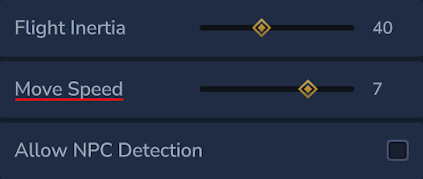
Value range: 0.1 to 10, default is set to 1.
- You can now move super fast or super slow, depending on the value.
Editing the Speed on Your Hytale Server
Changing speed settings lets you shape how players experience your server. Whether you’re building a custom gamemode or wanting to test out features, the game speed plays an important role. These values can be adjusted at any time, making it easy to adapt gameplay as your server evolves.
Helpful Resources
- How to Change the Death Penalty on a Hytale Server
- How to Enable PVP on a Hytale Server
- How to Become Admin on a Hytale Server
- How to Install Hytale Server Mods, Plugins & Assets
👉 For more Hytale guides, click here!





















