

While hosting your own Hytale server, you might want to have custom world seeds. Whether you’re chasing the perfect spawn or want to refresh existing worlds, choosing the right seed can help you get the perfect world. This is a powerful way to customize your experience, but the process can be challenging at first. With this in mind, we’ve created this Apex Hosting guide to help you change the world seed on your Hytale server 👏
Hytale Server – World Seed Guide
Before getting started, you need to know this: Hytale world seeds only use numbers. If you attempt to use letters or special characters, it will unload the world or revert back to the original seed. Besides this, we also recommend becoming an admin if you haven’t already done that. Whether you’re creating a new world with a custom seed or editing an existing one, follow the sections below to begin.
New Worlds
- Launch Hytale and join your server, then create a new world.

- Head towards your Apex server panel and click
Stopat the top. - Navigate to
File Management > FTP File Accesson the left, then login.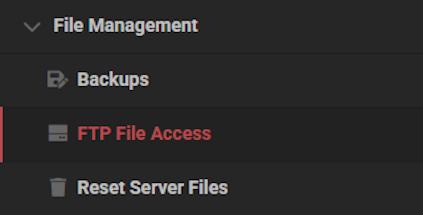
- Locate the
config.jsonfile inside theuniverse / worlds / [Your World]directory.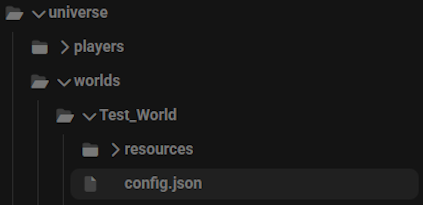
- Open this file up by double clicking, then find the
Seedoption in the editor.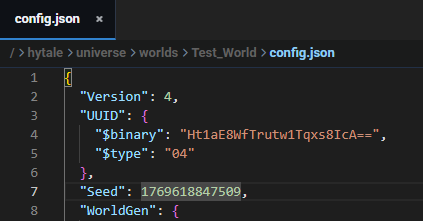
- Proceed to change this to any numerical seed you want.
- Afterwards, click
Saveat the bottom and return to the main panel.
Startup the server and join to confirm this worked.
You may have to use /tp world [Your World] if there’s a different default world selected.
Existing Worlds
- Head towards your Apex server panel and click
Stopat the top. - Navigate to
File Management > FTP File Accesson the left, then login.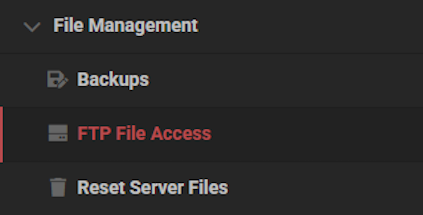
- Locate the
config.jsonfile inside theuniverse / worlds / [Your World]directory.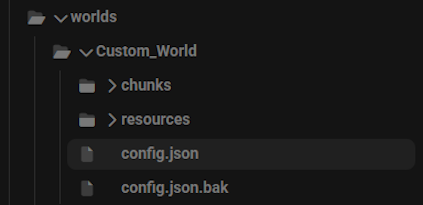
- Open this file up by double clicking, then find the
Seedoption in the editor.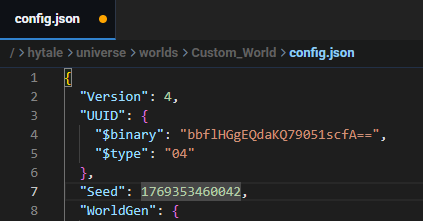
- With only numbers, change the seed to anything you want and click
Save.
- Afterwards, right-click the
resourcesfolder and select theDeleteoption.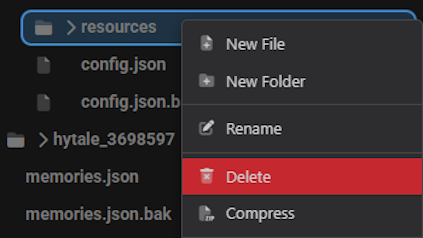
- (Optional): You can also delete the
chunksfolder, removing all world data. - Return to the main panel and
Startup the server, then join to confirm it worked.
You may need to use the /tp world [Your World] command to teleport to the world. Once there, explore new regions to see the new generation from your custom seed. If you’ve deleted the chunks folder, then the entire world should be completely new.
Custom Worlds in Hytale
Having your own custom worlds allows you to have a unique Hytale server experience. From the best base locations to rare nearby structures, you have the power to control the world. By experimenting with different seeds, you can create worlds tailored to your needs. Once you get the perfect world seed, invite your friends and jump into the action!
Hytale World Seeds – FAQ
Why is my custom seed not working in my Hytale server?
When creating a new seed for any world, make sure you are only using numbers. If you use letters or special characters, this will cause problems. Additionally, ensure you stopped the server before making any changes to the world’s config.json file. You can always confirm it got saved successfully by starting up the server and checking the file again.
Why can’t I find any new chunks after changing the seed?
If you’re able to teleport to the world, but chunks are still the same – then you need to explore new regions. This will begin using your new seed to generate the newer chunks. If you wanted the entire world to be new, then stop the server and delete the chunks folder. This will remove all previous regions with the old seed on your world.
Where can I find the new custom world in my Hytale server?
You can teleport to the new world by using the /tp world [Your World] command with admin permissions in-game. If you don’t know the world name, then use /world list to easily find that out. As for the world folders, you need to access the FTP File Access area from the server panel and navigate to the worlds directory.
How do I find cool world seeds for my Hytale server?
We encourage you to find world seeds on YouTube or other platforms. This is your best chance to see cool and awesome seeds for Hytale. Whether you want a specific starting area or the perfect place for a base, there’s a seed for it!





















