


After setting up a Hytale server, you may want to tweak certain gameplay mechanics to better fit your world or gamemode. One common adjustment is disabling fall damage, which can be useful for creative builds, hub worlds, or custom experiences. In this Apex Hosting guide, we’ll show you how to disable world fall damage on your Hytale server 👏
Disabling Fall Damage in Hytale Servers
- Head towards your Apex server panel and click
Stopat the top. - Navigate to
File Management > FTP File Access, then login.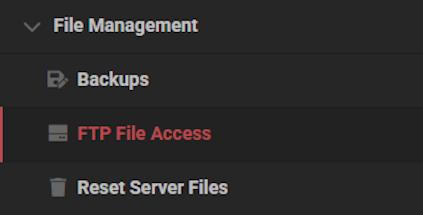
- Locate and enter the
universe / worlds / [Your World]directory.
- Double-click the
config.jsonfile, then findIsFallDamageEnabled. - Change this to
falseand clickSaveat the bottom.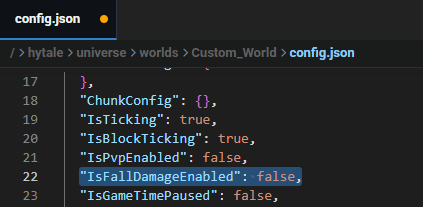
- Return to the main panel and
Startup the server, then join to confirm it works.
Helpful Resources
- How to Change the Death Penalty on a Hytale Server
- How to Enable PVP on a Hytale Server
- How to Become Admin on a Hytale Server
- How to Install Hytale Server Mods, Plugins & Assets
👉 For more Hytale guides, click here!
Hytale Server Without Fall Damage
Turning off fall damage helps avoid unnecessary accidents, such as falling inside of a deep cave. It’s also helpful when making hubs, spawns, or custom gamemodes on your Hytale server. Regardless of why you want to disable world fall damage, you have the right tools to make it happen! At any point, you can go back and undo the config changes to enable fall damage.





















