


Are you ready to battle your friends in Hytale? While exploring Orbis is fun, sometimes you just need to test your combat skills against other players. By default, however, you might not be able to do battle on your Hytale server.
In this Apex Hosting guide, we’ll show you how to enable PVP on your Hytale server to get the fight started!
How to Enable PVP
Changing this setting is quick and easy within your server files. Just follow these steps to turn the battlefield on:
⚠️ You can also use /world config pvp true with admin permissions to enable PvP.
- Head to your Apex Server Panel and Stop the server.
- In the left menu, click FTP File Access and login with your password.
- Navigate to the
Universefolder, then selectWorlds. - Open the folder for your specific World Name.
- Locate the
config.jsonfile and open it. - Find the setting labeled
"IsPvpEnabled": false. - Change this setting to
"IsPvpEnabled": true. - Save the file and Restart your server.


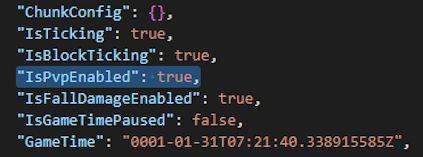
Once the server is back online, player-versus-player combat will be active!
Prepare for Battle!
Now that PVP is enabled, you'll need to watch your back while exploring!
Whether you are hosting a tournament or just want a friendly duel, the option is now yours! Craft your best gear and get ready to do battle in the world of Hytale – unsheathe your weapons and let the chaos begin!





















