


Managing a Hytale server often requires working with player data, primarily their UUIDs. These IDs are used for permissions, moderation actions, and server configurations. With this in mind, it’s important to understand the methods for finding them. In this Apex Hosting guide, we will show you how to easily find player UUIDs in Hytale 🔥
Finding Player UUIDs in Hytale
There are a few different ways to locate a player UUID, depending on various factors like if the player is online or if you’re using a third-party service. Some methods are faster, while others are better suited for offline players or file level management. The sections below outline each option so you can choose the most efficient approach for your situation.
Username Websites
One of the most effective ways to find UUIDs in Hytale is using third-party sites. These online services allow you to look up any username, revealing their player information. We recommend using HytaleOasis or hytl.tools, but feel free to find others to use. Once you search for a username, the UUID will be found on their profile page.
In-game Command
A default method to find UUIDs in Hytale is using the /whoami command, while the player is connected to the server. This will not work if the user isn’t logged in, but is still a convenient way to quickly grab the UUID if they’re online.
- Head towards your Apex server panel, then navigate to
Server Management > Console.
- Enter
/whoami [player]in the text box. E.g., /whoami Simon
- Look for the
UUIDin the command’s return message.
Keep in mind that you can use this command in-game with admin permissions too.
Server Files
The last way to find UUIDs in Hytale is looking through the player files on the server. This isn’t the best method, as it will take more time compared to the others. You would need to click through each file labeled with a UUID, then find the username inside to verify it’s the right one.
- Head towards your Apex server panel, then navigate to
File Management > FTP File Access.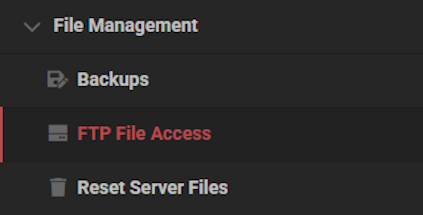
- Login with your password and enter the
universe / playersdirectory.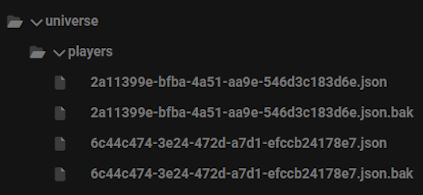
- Double-click on any of the UUID.json files to open them up.
- Locate the
Nameplateoption, then look under for their username.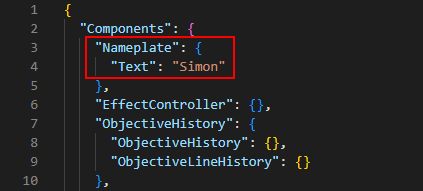
- Repeat this process until you find the right account.
Hytale Player UUIDs
Player UUIDs are essential for managing a Hytale server, especially when working with permissions, moderation tools, or server files. By knowing where and how to find them, you can handle player related tasks more efficiently and avoid issues caused by username changes. With these methods, you will always have a reliable way to identify any player on your Hytale server!





















