


Managing a Hytale server means wanting total control over player permissions, whether you prefer typing commands, editing files directly, or using a slick web interface. The Hytale LuckPerms mod gives you exactly this power, offering one of the most flexible permission systems available. In this Apex Hosting guide, we’ll show you how to install LuckPerms on your Hytale server with our one-click installer 👏
LuckPerms Installation
- Head towards your Apex server panel, then click
Stopat the top. - Navigate to
Server Configuration > Modboxon the left.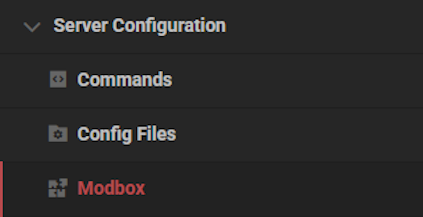
- Locate the mod via categories or the search bar, then select it.
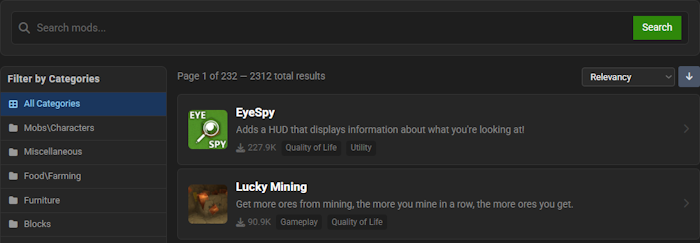
- Choose a version on the right and click
Install.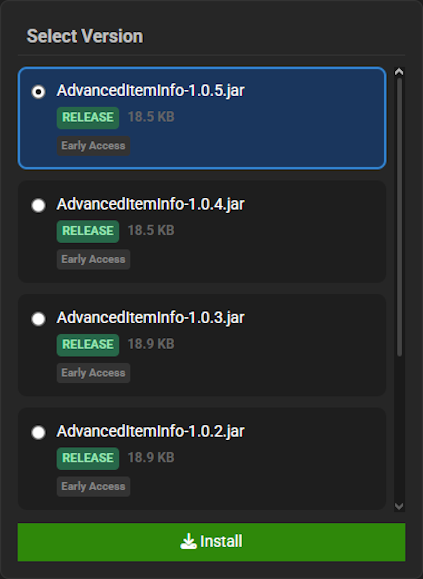
- Return to the main panel and
Startup the server to load the mod.
LuckPerms Showcase
LuckPerms revolutionizes server management with its powerful and flexible permission system. This plugin introduces several key mechanics that give you complete control over your server’s player access.
Permission Groups
Take full control over your server by creating distinct permission groups for your players. With LuckPerms, you can easily assign specific abilities and restrictions to different player ranks, ensuring a structured and organized experience for everyone. This level of customization allows you to build a truly unique server hierarchy.
Web Editor
Experience the ultimate convenience with an intuitive, web-based editor for all your permission needs. Simply generate a link in-game and navigate to the LuckPerms web editor to visually manage groups and permissions, making complex setups incredibly straightforward. This powerful tool streamlines the entire process, allowing you to apply changes with the click of a button.
Command-Based Setup
For those who prefer direct control, a comprehensive command-based setup is available directly in your game. LuckPerms offers an extensive list of commands that allow for rapid and precise permission adjustments without ever leaving the server. This method is perfect for making quick changes on the fly and for integrating permissions into automated scripts.
Modded Hytale Server Hosting
LuckPerms is the ultimate tool for creating a structured and fair gameplay experience by giving you total control over player permissions. With your server now in order, you are ready to explore everything Hytale has to offer, but remember that Zone 1 is just the beginning. Invite your friends and prepare for an unforgettable journey!
Frequently Asked Questions
Below are frequently asked questions about the gameplay and configuration features in LuckPerms.
What is the main purpose of LuckPerms?
LuckPerms is a permissions mod for Hytale. It allows server administrators to control what features players can use. This is achieved by creating groups and assigning specific permissions to them.
How can I configure permissions in LuckPerms?
There are three methods for setting up permissions. You can use in-game commands, navigate to the configuration files for direct editing, or locate the web editor for a graphical user interface.
What are the core features of LuckPerms?
LuckPerms is designed to be fast and reliable, with performance and scalability in mind. It is also flexible, supporting a variety of data storage options, and provides extensive customization settings. The mod is available for free.





















