


Every great RPG adventure is defined by the legendary gear you discover, from blades that change with the day-night cycle to swords that can raise the dead. To bring this legendary experience to your world, the Hytale mod Wan’s Wonder Weapons adds an entire arsenal of powerful relic weapons, each with its own unique history and special abilities. In this Apex Hosting guide, we’ll show you how to install Wan’s Wonder Weapons on your Hytale server with our one-click installer 👏

Wan’s Wonder Weapons Installation
- Head towards your Apex server panel, then click
Stopat the top. - Navigate to
Server Configuration > Modboxon the left.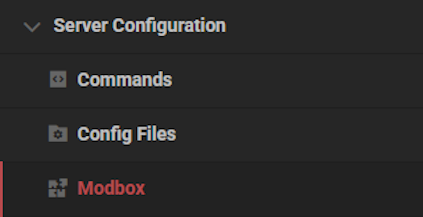
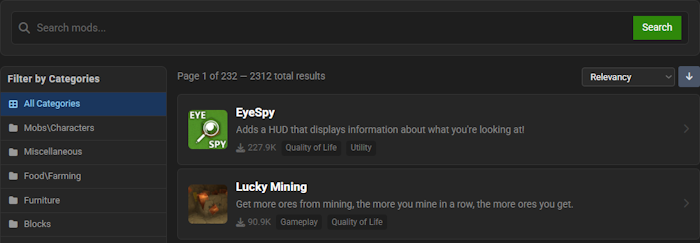
- Locate the mod via categories or the search bar, then select it.
- Choose a version on the right and click
Install.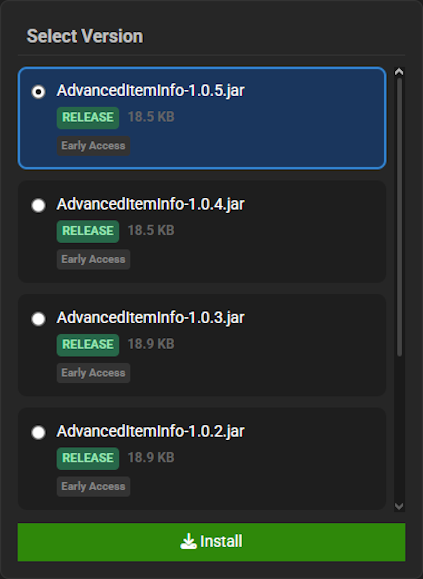
- Return to the main panel and
Startup the server to load the mod.
Wan’s Wonder Weapons Showcase
This mod introduces several key mechanics designed to completely overhaul your combat experience with new weapons and abilities. Get ready to master a whole new way to fight and conquer your world.
Unique Relic Weapons
Wan’s Wonder Weapons adds a massive collection of powerful, one-of-a-kind relic weapons to the game. This arsenal includes daggers, swords, a longsword, maces, a battleaxe, and a scythe, ensuring there is a perfect weapon for every type of warrior. Dominating your foes has never been more stylish or effective.
Devastating Combat Abilities
Each armament included in Wan’s Wonder Weapons features a combat ability bar that fills as you fight. Once charged, you can press the Q key to unleash a devastating unique ability, turning the tide of any battle in your favor. This system adds a new layer of strategy to every single encounter.
Stance & Form Switching
Select weapons from Wan’s Wonder Weapons boast the ability to switch between different forms or combat stances on the fly. By pressing the R key, you can instantly adapt your fighting style to the situation at hand. This versatility makes you a much more unpredictable and formidable opponent.
Integrated In-Game Documentation
With the Voile library installed, Wan’s Wonder Weapons provides comprehensive built-in documentation. This allows you to view the full weapon list, crafting information, and gameplay controls directly in the game. You will have all the knowledge you need to master these powerful relics right at your fingertips.

Modded Hytale Server Hosting
Wan’s Wonder Weapons completely revolutionizes your Hytale combat experience with a vast arsenal of powerful and unique armaments.
Adventure awaits.
Invite your friends and prepare for an unforgettable journey!
Frequently Asked Questions
Below are frequently asked questions for setting up the Wan’s Wonder Weapons mod.
Can I configure the weapon recipes?
Currently, Wan’s Wonder Weapons does not include a separate config file for recipe adjustments. To craft the weapons, head towards a Tier 3 Weapon Bench in-game. All relic recipes are available there by default. As the mod is in active development, configuration options may be added in a future release.
Will this mod cause lag or multiplayer compatibility issues?
The mod is built to be lightweight, but performance can vary. Lag or low FPS in multiplayer may occur depending on the number of other mods installed and the hardware specifications of your Hytale server. Compatibility with other weapon or content mods is not guaranteed. If you experience a crash, locate your `logs` folder to review the report for potential conflicts.





















