

Playing Hytale is always an exciting experience, but it’s even better when exploring with friends. Whether you are building massive structures or fighting through dungeons, jumping into multiplayer is the perfect way to experience the game. However, you first need to know how to connect to the game properly. In this Apex Hosting guide, we’ll show you how to join your Hytale server to get you started on a brand new adventure.
Direct Connection
To join quickly without saving the server details, use the Direct Connect method:
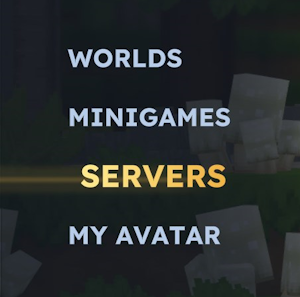
- Launch Hytale and select Servers from the main menu.
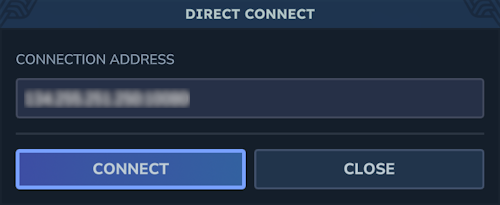
- Click Direct Connect at the bottom right of your screen.
- Enter your Hytale server
IP Address:Portin the text box, then click Connect. - Type the server password when prompted, if it’s enabled.
- Wait for your connection to establish, then boom – you’re playing on the Hytale server!.

Adding a Server
To save your server for easy access later:
- Launch Hytale and select Servers from the main menu.
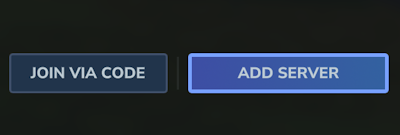
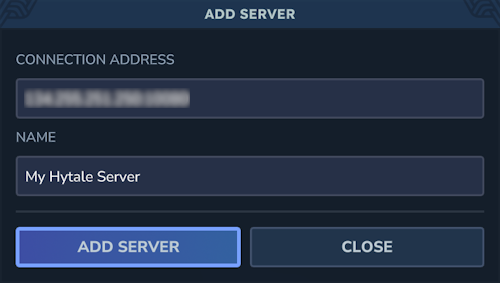
- Click Add Server at the bottom right of your screen.
- Enter the server
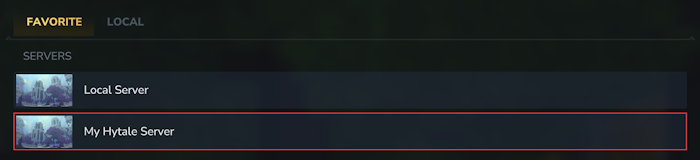
IP Address:Portand Name in their fields, then click Add Server. - You will see it appear on your Favorites list; double-click on it to join.
- Type the server password when prompted, if it’s enabled. Wait to connect!.
Hytale Connection FAQ
Where can I find my Hytale server IP Address & Port?
You can find your specific connection details inside your Apex Server Panel. This is available on your server overview page.
Why can’t I connect to my Hytale server?
Connection issues are often caused by a version mismatch between the client and the server. Try restarting the server to ensure it is updated and online. Also, double-check that you have typed the IP address correctly.
Why am I stuck connecting to the Hytale server?
If the connection hangs, the server might still be starting up, loading mods, or generating the world. We recommend waiting a few moments before trying to connect again.
Adventure Awaits!
Now that you are connected, the vast world of Hytale is yours to explore. Whether you want to survive against dangerous mobs or build a peaceful town, joining your server is the first step. Don’t forget to add the server to your favorites list so you can easily rejoin your session later. Invite your friends and prepare for an unforgettable journey!





















