


Hytale servers thrive on creativity, collaboration, and fair play – but every server owner eventually needs moderation tools. Whether you’re removing a disruptive player or enforcing rules, knowing how to kick and ban players is essential for keeping your community enjoyable. In this Apex Hosting guide, we’ll walk you through the exact commands you need to temporarily or permanently remove players from your Hytale server 🔥
⚠️ Becoming an admin / op is required to run these commands.
View the server player list by opening up the map in-game via pressing ‘M’ on your keyboard. If you do not see the list, then press ‘P’ to enable it. This helps with remembering usernames or double-checking for confirmation.
How to Kick Players
- Launch Hytale and join your server, then open the chat.
- Type
/kick [player]and pressEnteron your keyboard.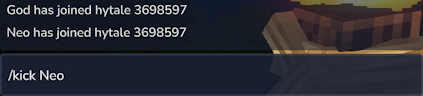
- This will instantly disconnect them from your Hytale server!
How to Ban Players
- Launch Hytale and join your server, then open the chat.
- Type
/ban [player] [reason]and pressEnteron your keyboard.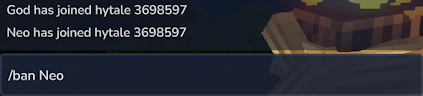
- This will permanently ban the player from your Hytale server.
How to Unban Players
- Launch Hytale and join your server, then open the chat.
- Type
/unban [player]and pressEnteron your keyboard.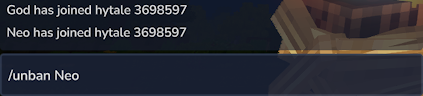
- This will immediately unban the player from your Hytale server.
You can also use all of these commands in the console, just without the slash (/).
Player Management
Keeping your Hytale server fun and welcoming starts with smart moderation. By mastering kick, ban, and unban commands, you maintain control without interrupting the experience for everyone else. Establish clear server rules, communicate expectations with your players, and apply punishments consistently. For larger servers, consider using bans sparingly and kicks as a first response, escalating only when necessary.





















