

Hytale servers can experience lag, crashes, or performance drops as more players actively join and explore in-game. Whether they’re dropping too many items or loading too many new chunks, problems may arise that impact performance. Optimizing your server helps create smoother gameplay, reduces resource spikes, and improves overall stability for everyone connected. In this Apex Hosting guide, we will show you how to optimize your Hytale server 👏
Max View Distance
One of the first ways to optimize your server is to adjust the max view distance. This controls how many chunks are loaded around each player in-game. If the value is set too high in the settings, this can cause major issues. We recommend setting this to a max view distance of 10 or lower. The following steps shows you how to do that:
- Head towards your Apex server panel and click
Stopat the top. - Navigate to
Server Configuration > Config Fileson the left.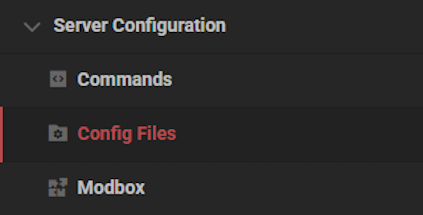
- Select
Hytale Server Settingsfrom the list of options.
- Edit the
Max View Distanceto 10 or lower, then clickSave.
- Click
Restart Nowand wait for the server to finish loading.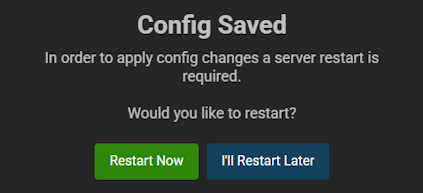
- Join the server to confirm everything worked.
Hytale Server Memory
Another important factor when optimizing your Hytale server is having enough memory (RAM). This ensures that the server can process and load efficiently, while users are actively playing. Take a look at our Hytale Server RAM Recommendations to learn more. Having more memory means you can have more players, mods, and worlds. If you don’t have enough, then the server could run into problems.
Optimization Mods / Plugins
With the help of developers, there are plenty of mods and plugins available to optimize the performance on your Hytale server. These range from backend changes to clearing up dropped items in-game. Take a look at our suggested ones:
- Nitrado Performance Saver – This automatically manages server performance to reduce lag and prevent crashes. It adjusts view distance during high strain, limits TPS for consistent gameplay and lower idle resource usage. It also performs smart memory cleanup to keep RAM usage efficient without causing lag spikes.
- HyOptimizer – This improves server stability by reducing console spam, managing memory usage, cleaning up dropped entities, and providing real-time performance metrics. It filters excessive log warnings and helps prevent memory crashes through automated cleanup while safely removing unnecessary items to maintain TPS.
- Server Optimizer – This is a lightweight, automated plugin that maintains smooth server performance by dynamically adjusting view distance, simulation ranges, NPC behavior, and idle player settings based on server conditions. It also includes built-in diagnostics, automatic configuration repair, and stress memory cleanup to reduce lag.
👉 Use Modbox to install and search for more Hytale optimization mods!
World Pregeneration
In some cases, pregenerating your worlds might be the best action to take for optimization. If you’re hosting a survival world for friends or building a community, players will be actively exploring the world. This will automatically load chunks, causing resource spikes in the server if too many are doing it.
With the /world settings pregenerate set [minX] [minZ] [maxX] [maxZ] command, you can forceload these regions. The server may lag during this process, but after you may see stable performance as players explore your pregenerated world. Use the X and Z coordinates accordingly in the command, from the minimum to the maximum location.
⚠️ Being an admin on your Hytale server is required to run this command.
Hytale Optimization Guide
Optimizing your Hytale server helps maintain stable performance, reduce lag, and improve the experience for all players. Adjusting view distance, allocating enough memory, installing optimization mods, and pregenerating worlds are reliable ways to keep your server running smoothly. With these methods, you can confidently support growing player communities and more advanced server setups.





















