

Exploring new terrain in Hytale is exciting, but generating chunks on the fly can cause noticeable lag on busy servers. Pregenerating your world helps smooth out that experience by loading terrain ahead of time, so players aren’t triggering heavy generation while they roam. This is especially useful for larger maps or modded servers where performance matters even more. In this Apex Hosting guide, we’ll show you how to pregenerate a world on your Hytale server via vanilla commands or mods 👏
Vanilla Pregeneration Setup
By default, you can pregenerate chunks in your Hytale server via vanilla admin commands. During this process, do not have players on the server since it will be laggy. Additionally, make sure the pregeneration size isn’t too high for your world. When you’re ready, follow these steps:
- Launch Hytale and join the server with your admin account.
- Enter the following command in-chat:
/world settings pregenerate set [minX] [minZ] [maxX] [maxZ]
Set the X and Y coords accordingly, from minimum to maximum.
- (Optional): Add
--world [World]to the end of this command for specific worlds. - Head towards your Apex server panel and click Restart at the top.
- Navigate to
Server Management > Consoleat the top left.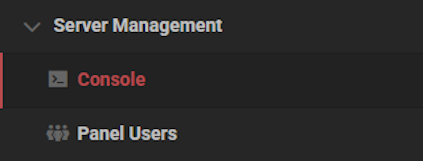
- You can monitor the pregeneration process from here.

- Please wait for the pregeneration to completely finish before playing.
If successful, you should see a message like “Finished loading X chunks. Finished in …” when it’s done.
World Pregeneration Mods
You can find various Hytale mods to pregenerate your world, but we recommend the following:
- Chunker – This pregenerates regions ahead of time to reduce lag when players explore. It lets you set a center, radius or custom region, and control the generation speed to manage performance. It supports pausing, resuming, progress tracking, optional world borders, and trimming chunks outside the selected area.
- Chunk Generator – This pregenerates terrain within a set radius to reduce exploration lag, using a square spiral pattern to prioritize nearby areas first. It runs asynchronously with TPS throttling to protect server performance and saves progress so generation can resume after restarts.
Quickly install these by using our Modbox one-click installer for your Hytale server!
Review the CurseForge description of the mod you selected to confirm the process. It should show you what commands to use for the pregenerate chunk radius, start, stop, and other actions. You must be admin / op to run these commands. These mods are considered to be better than the vanilla process, as they have more direct control.
Helpful Tips
- We strongly recommend against having players play while chunks are being pregenerated. A common side effect is lag, resulting in poor performance.
- Avoid pregenerating a large amount of chunks at one-time. We suggest doing a little at a time, unless you’re okay with a long time for it to finish.
- Only pregenerate worlds that users will be actively exploring. Every region that is loaded will create a file in the server, so a large number of them will make the world size be large.
Hytale World Pregeneration
Pregenerating your Hytale world is one of the best ways to prevent exploration lag and keep gameplay smooth for everyone. Whether you use the built-in vanilla commands or install a mod for more advanced control, taking the time to generate chunks ahead of launch can make a huge difference in performance. Just remember to monitor the process, avoid overloading your server, and only pregenerate areas that players will actually explore. With everything set up properly, your Hytale server will be ready for seamless adventures!





















