

Resetting player data on a Hytale server can help resolve glitches, fix broken inventories, or fully restart a player’s progress when needed. There are two different ways to handle this, each affecting player data in a different way and with different requirements. In this Apex Hosting guide, we’ll walk through both methods so you can choose the right approach for your server and situation.
Resetting Player Data
There are two ways to reset player data, using a command or deleting the file. We recommend both methods, but they aren’t exactly the same. One of them requires the player to be online, while the other doesn’t. They also delete data differently, which is important to understand.
- Command: Removes only inventory and location of the player. They must re-log afterwards.
- File: Completely removes everything about the player from the server. Must be offline during it.
In-game Command
The player must be online and connected to the server for the command to work. You must be an admin to run this command in-game.
- Launch Hytale and join the server with an admin account.
- Type
/player reset --player [username]in-chat.
- If successful, the player will have their data reset.
Server File
The player must be offline for this process to work properly. You will need to know the UUID of the player, which you do so here.
- Head towards your Apex server panel and click
Stopat the top. - Navigate to
File Management > FTP File Access, then login.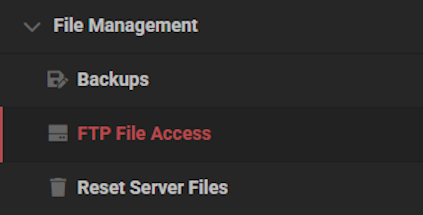
- Enter the
universe / playersdirectory, then find the right file.
- Right-click it and select
Delete, then confirm it in the next prompt.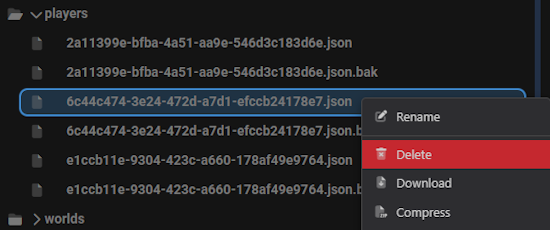
- Repeat this process for the .json.bak file for the same player.
- Return to the main panel and click
Startat the top. - Wait for the server to load, then the player data should be reset.
⚠️ You can remove all player data by deleting the players directory.
Remove Player Data in Hytale
Resetting a player’s data on your Hytale server is a great way to fix issues or experiment. Regardless of the reasoning, it’s important to understand the process. Using the command or file method depends on what you do with the data. Remember, deleting the file means the player gets completely reset – as if they never joined the server. The command simply resets their inventory and location, which doesn’t remove discovered zones and other information.
Helpful Resources
- How to Create a New World in Your Hytale Server
- How to Restore a World in Your Hytale Server
- How to Transfer Singleplayer Saves to Your Hytale Server
- How to Install Hytale Server Mods, Plugins & Assets
👉 For more Hytale guides, click here!





















