

Managing a Hytale server often means quickly accessing the items you need for building, testing, events, or player support. Whether you’re replacing lost gear or preparing a custom experience, spawning items can save valuable time. In this Apex Hosting guide, we’ll show you the two simplest ways to spawn items on your Hytale server 👏
Spawning Items in Hytale
There are two easy ways to spawn items in your Hytale server, using commands or creative mode. Both methods require you to be an admin, so make sure you do that beforehand. When you’re ready, choose a section and follow the steps!
Using Commands
- Launch Hytale and join the server with your admin account.
- Type
/spawnitem [item] --qty=[amount]in-chat.
- The item(s) will spawn next to you in the world!
⚠️ If you misspell an item name, you should see suggestions in chat to help you.
Using Creative Mode
- Launch Hytale and join the server with your admin account.
- Press ‘O’ on your keyboard, then open your inventory.
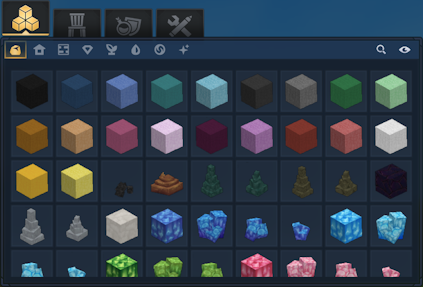
- Begin to look for an item you want, then select it.
Item Spawning In-game
Spawning items comes in handy when you want quick tools or testing around. Regardless of why you want to do this, knowing the best ways to spawn items is important for your Hytale server. Using commands or creative mode allows you to easily do this, without any effort! With these tools, you can efficiently manage gameplay, support players, and bring their world ideas to life.
Helpful Resources
- How to Change the Death Penalty on a Hytale Server
- How to Enable PVP on a Hytale Server
- How to Become Admin on a Hytale Server
- How to Install Hytale Server Mods, Plugins & Assets
👉 For more Hytale guides, click here!





















