

Hytale is launching their Server Discovery! Be one of the first owners to get their server added in-game. This can help bring in new players and establish yourself in the community. Start the process early before Update 5 and secure your spot in the listings. In this Apex Hosting guide, we’ll show you how to set up your Hytale server in the Server Discovery 👏
How to Create a Server Listing in Hytale
The process to have your own Hytale server appear in-game is easy! However, the Hytale Team will have to approve of your server before it actually gets added to the Server Discovery. Follow the sections below to get started.
Adding a Server to Your Account
- Head towards the Account Manager for Hytale and sign-in.
- Select
Server Profileson the left, then clickCreate Server.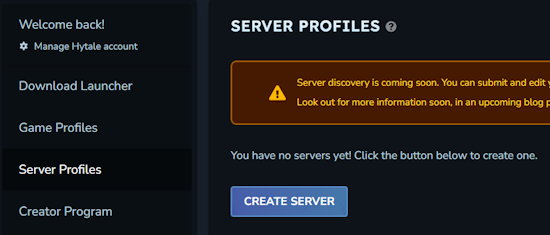
- Begin filling in your Hytale server details, e.g.
Name,Description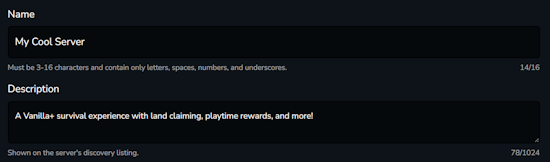
- When you’re finished, click
Saveat the bottom.
Hytale Domain Verification
For those who have a dedicated server with a custom domain, you will need to verify it with Hytale. When prompted after adding the server to your account, follow the steps provided. For instance, you may have to create a TXT record with specific values to verify the domain.
Hytale gives you step-by-step instructions for popular domain providers, such as GoDaddy. When you’re finished following the steps, click Verify at the bottom to finish the process.
Waiting for Approval
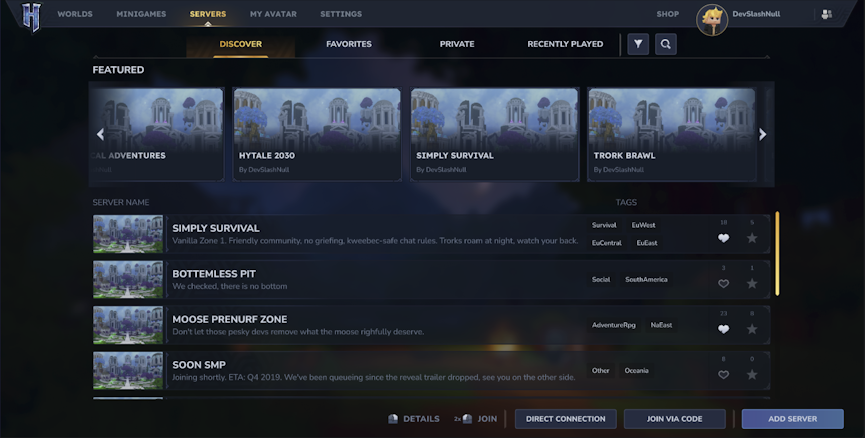
Once you complete creating a server on your Hytale account, it will need to be approved before it shows in the Server Discovery. This can take anywhere from 1-7 days, depending on the number of server applications. Once approved, your Hytale server will be found in-game!
After Being Approved
When approved: make sure to link your Hytale server with your server discovery token.
- Copy the server discovery token from your Hytale Server Profile page.
- (Regenerate Token if needed)
- Afterwards, navigate to your server console and enter this command:
/discovery link [token] - Make sure to replace “[token]” with your unique server discovery token.
If you haven’t already, make sure to manually authenticate your Hytale server. Once you do that and link your server via the token, you will begin appearing in the Server Discovery list!
Server Discovery in Hytale
With the release of Update 5, players will be able to search for multiplayer worlds in the Server Discovery. For those who want their own server to be easily searched, you need to add the server in your account – then get approved by the Hytale Team. This process is streamlined for your own convenience, along with domain verification.
We hope this helped you get your own Apex Hosting Hytale server added in Server Discovery!
Important Note: If you aren’t showing in the server discovery, ensure that your Hytale server is up to date. Do this by restarting the server and double-checking that you didn’t disable automatic updates in Customizations.






















