


Vanilla Minecraft is jam-packed with a variety of content to explore and use, but this can often become repetitive after playing for a long time. While there are occasional updates that bring new content, many desire a better way to add new content. This dilemma is solved with Minecraft mods, which can completely redefine the gameplay by adding or upgrading features. Adding dangerous mobs, navigating through new dimensions, and finding interesting items is just the surface layer of what can be achieved with these. Whether you are adding mods to an existing modpack or to a standalone Forge setup, you can use them to build your dream server. Adding mods to your Minecraft server is simplified with our panel uploader, so we have created this tutorial to help you get started.
How to Download Mods
- Visit the CurseForge Minecraft Mods page.
- Browse for the mod you wish to use, then click the page.
- From there, click
Filesat the top of the mod page.
- Scroll down and click the
View Allbutton to access all of the available downloads. - Find the version you wish to play with, then press the
Downloadbutton to the right.
- Save the .jar file to a safe location, as it will be needed shortly.
Server Installation
Now that your desired mod(s) have been installed to your computer, you must now upload it to the server for use. Specific mods may have additional steps required, but each of them will follow the same general procedure:
Setting the Game Version
- Navigate to the Apex server panel, then stop the server.
- Scroll down to the
Game Filesection and open the dropdown menu.
- Ensure the server is set to match the version of the mod downloaded previously.
E.g. Forge 1.19.2 or Fabric 1.19.2 - Afterwards, choose to
Change Version, then selectI’ll Restart Later.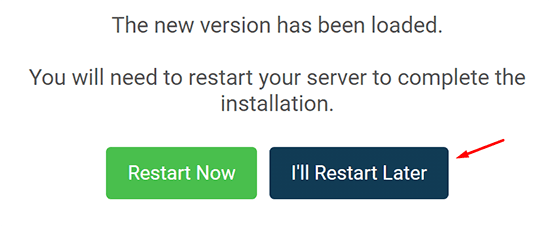
Uploading Mod Files
- While on your server panel, click
FTP File Accessnear the top left.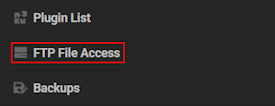
- Login with your password, then locate the
modsdirectory from the list.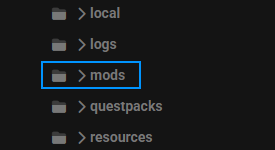
- Drag + drop all the
JARfiles into this folder, then wait for them to upload.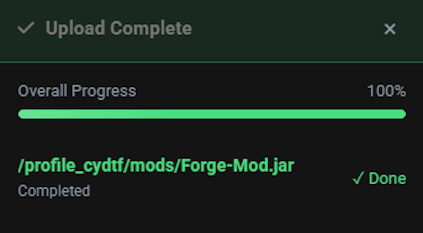
- When everything is finished, restart the server from the main panel.
If some files are too large to upload via the panel, then you might need to use FileZilla.
(Optional) Generating a New World
For some mods, a new world must be created in order for the new changes to take effect. This is often necessary for mods that add new ores, structures, and other world changes. Creating a new world is very quick thanks to our panel.
- From the Apex panel, stop the server until it is fully offline.
- Scroll down to the
Worldsection and press theChange Worldbutton.
- When prompted, type in a unique world name.
- Following this, press the green
Change Worldfor the adjustments to take effect.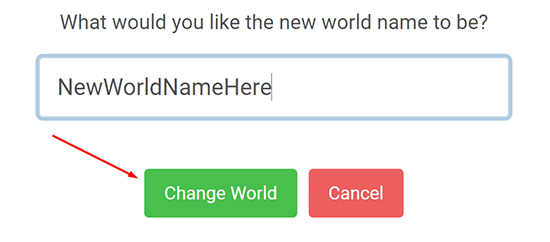
- Finally, restart the server to load up the mod with a new world.
Note: Once the mods are loaded on your server, any players will need to have Forge installed client-side alongside the matching mods. For more information on this, visit our full tutorial on installing mods on your client here.
Common Issues
Server is crashing when starting up:
If the server begins crashing after uploading mods, there are many potential reasons why this may occur. First, ensure that the mod and server are running the same version as well as use the matching modloader. Fabric mods will not work on Forge server and vice versa. For other errors, we recommend checking your server console for a more specific error such as a duplicate mod, missing dependency, or more. Some mods are only required on the client-side and can crash a server if installed, so we recommend keeping an eye out for those. Once the issue has been resolved, restart the server to try loading up the mod(s) again.
Server is stuck loading after adjusting mods:
If you have recently adjusted or removed any mods and the server is stuck, this may be due to missing mod IDs in your world. When this happens, the server prevents itself from starting in order to prevent any lost data. This can be bypassed by using the /fml confirm command in the server console or generating a new world.
Missing dependency error when starting the server:
In some cases, certain mods require additional dependency mods in order to function properly. This is often either specific on the mod page itself or may be found within the Relations tab at the top of the Curseforge page. Once located, install the required version for the mod and install it to the server like before. Afterwards, restart the server to see if it loads up properly.
Helpful Links
How to Find Minecraft Mods
How to Install Minecraft Mods (Client-Side)
How to Install Forge (Client-Side)
FAQ: Minecraft FAQ: Adding and Managing Mods on Your Server
How do I add mods to my Minecraft server?
First, install a mod-compatible version like Forge or Fabric on your server. Then, upload your mod .jar files to the mods folder via your server panel’s file manager. Restart the server to apply the changes. For some mods, you may need to generate a new world for full functionality.
Where can I safely download Minecraft mods?
The most trusted source is CurseForge, which offers thousands of verified mods with version compatibility filters. Always match the mod version to your server version to avoid crashes or incompatibility issues.
Why is my Minecraft server crashing after adding mods?
This usually happens when mods are incompatible with your server version or modloader (e.g. trying to use a Fabric mod on a Forge server). Crashes can also result from missing dependencies or mods meant only for client-side use.
What is the mods folder in Minecraft?
The mods folder is where you place all mod .jar files for them to be loaded by the server. It exists in the root directory of your Minecraft server or client and only functions when a modloader like Forge or Fabric is installed.
Can I use Fabric mods on a Forge Minecraft server?
No. Fabric and Forge are two separate modding platforms and are not compatible with each other. Mods made for one will not run on the other, even if the game version is the same.





















