



🚀 Level up your Minecraft server with new software!
Introducing LeafMC, a server software designed to help you create the ultimate Minecraft experience. Whether you’re running a network, small community, or vanilla server, you can expect high performance, optimizations, and smooth gameplay with this new software. For those wanting an alternative to Spigot, Paper, or Purpur, Leaf is a solid choice. Don’t worry, it comes with all the configurations you require to run a powerful community.
In this Apex Hosting guide, we’ll cover everything you need to know about LeafMC and show you how to install it on your Minecraft server – let’s begin!
What is LeafMC?

LeafMC, Leaf for short, is a Paper fork focused on balancing performance, vanilla behavior, and stability. This software is specifically designed for high player networks or high entity counts, meaning it can handle a lot of players or mobs at the same time by introducing an enhanced asynchronous system, optimized chunk generation, and improved resource management.
This server software is compatible with most Minecraft plugins, making it a flexible option for you to try out.
Is LeafMC Good?
Yes! LeafMC offers several advantages for both small and large Minecraft servers:
- Improved performance: Reduced MSPT compared to Paper in tests, meaning less lag.
- Better world generation: Faster chunk generation for large maps.
- Optimized for heavy loads: Handles high mob counts and busy servers more effectively.
- Plugin compatibility: Most Paper plugins work seamlessly with LeafMC.
Don’t believe us? 👇 Check out Leaf vs Paper below to see the test results:
| Scenario | Paper | Leaf | Leaf + Async | Performance Gain |
|---|---|---|---|---|
| Default Settings | 3.7 | 2.8 | — | 24% faster |
| High Mob Counts | 8.1 | 5.8 | 4.5 | 28–44% faster |
| Metric | Paper | Leaf | Improvement |
|---|---|---|---|
| World Generation (2048 block radius) | 8:37 | 7:53 | 8.5% faster |
How to Install Leaf
If you haven’t already, purchase an Apex Hosting Minecraft Server to get started 🔥
- Head towards your Apex server panel, then locate the
Game Filearea.
- Click on the dropdown, then search for “Leaf” and choose a game version.
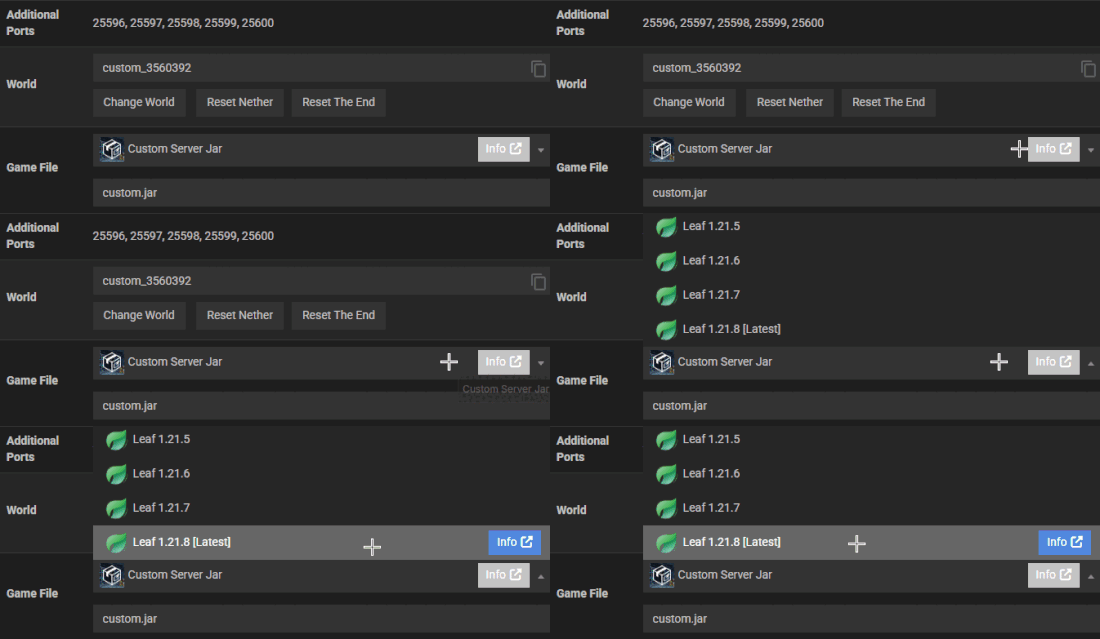
- In the prompt(s), click
Change Version>Generate New World>Restart Now.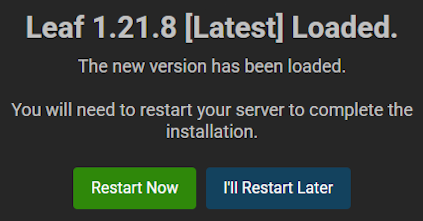
- Wait for the Minecraft server to load, then try joining to confirm it works.
Leaf Configuration
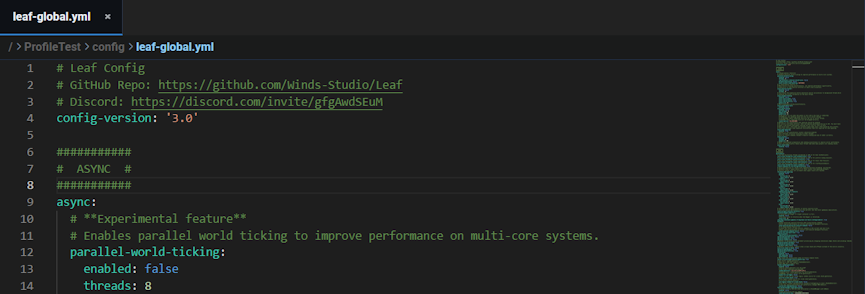
Just as you would with Spigot, Paper, or Purpur, you can edit various config files with Leaf. These include: gale-global.yml, gale-world-defaults.yml, and leaf-global.yml. There are also default Paper files that you can also edit too. Each one contains settings and options, such as async, chat messages, minor optimizations, and so much more.
👉 Visit the Official Leaf Documentation to learn more.
You can access and edit these configs by logging into the FTP File Access area with your password. Afterwards, navigate to the config directory and open up any file to begin editing it.
Frequently Asked Questions
Yes! All plugins should be compatible with Leaf as long as they are compatible with the server version. However, if you notice an issue – report it here.
Yes, LeafMC has Purpur patches and features. Only some settings are moved to the newer config files.
Yup! You can do that like any other Minecraft server via editing configuration files and tweaking options.
You can donate to LeafMC by using Open Collective or Dreeam’s AFDIAN (supports PayPal / Stripe).
LeafMC Server Hosting
Upgrade your hosting experience with LeafMC, giving you the best performance and stability for any Minecraft server. With its optimized systems, it can easily handle high player counts and heavy entity loads. Expect smooth gameplay with efficient world generation, along with various config files to customize your server. Leaf is built for both small and large communities, private or public! Get started today and design your perfect Minecraft server with LeafMC 👏





















