


When setting up a Minecraft server, some owners may decide to disable the End, Nether, or both dimensions. However, the process to do that varies depending on the type of server you host. For the most part, the steps are simple – but we’ll help you along the way. In this Apex Hosting guide, we will show you how to disable the End and Nether on your Minecraft server!
How to Disable the End
If you’re hosting a Vanilla Minecraft server, then you need to switch to Spigot or Paper to disable the End dimension. This can be done by using the Game File area to switch server versions. Make sure to keep the same game version too, then follow the instructions below. If you are running Forge / Fabric, then skip to the appropriate section to disable dimensions.
- Head towards your Apex server panel, then click “
FTP File Access” and login.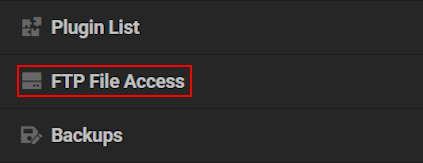
- Proceed to locate the bukkit.yml file and click “
Edit” on the right.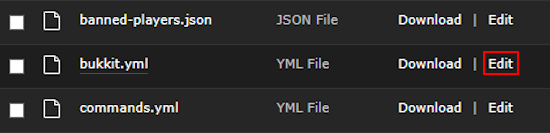
- Change allow-end from “
true” to “false”, then save changes and restart the server.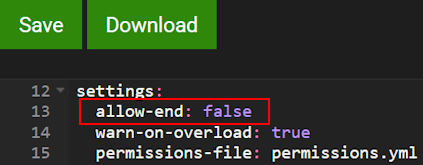
- Join and see if you’re able to enter the End dimension. You shouldn’t be!
How to Disable the Nether
The following steps are universal, meaning you can do this on any server type. This includes Vanilla Minecraft, Spigot, Paper, Forge, Fabric, and others. When you’re ready:
- Head towards your Apex server panel, then click “
Config Files” on the left.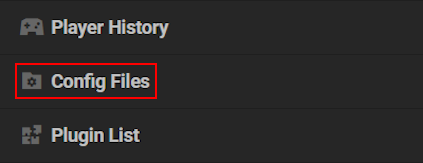
- Continue to click “
Server Settings“, near the top on this page.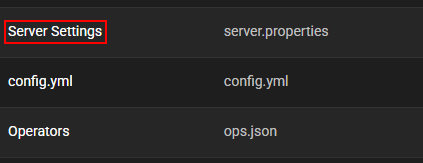
- Open the dropdown menu for Allow Nether and select “
Disabled” – then save changes.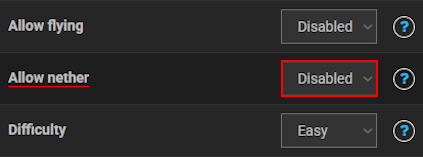
- Restart the server, then join to see if the Nether is disabled.
Forge & Fabric – Disable End / Nether
Unfortunately, there isn’t a straightforward process to disable dimensions on a Forge or Fabric Minecraft server. The process will involve installing a mod, then editing its config file. We strongly recommend using AntiPortals, as it supports Forge, Fabric, NeoForge, and Quilt. If this doesn’t have your game version, then search for another mod on CurseForge.
👉 How to Install Mods on a Minecraft Server
When you’re ready, follow the instructions below to get started:
- Install AntiPortals or another compatible mod that disables the dimensions.
- Afterwards, locate the configuration file via the “
FTP File Access” area in the panel. - Continue to make the necessary changes, such as disabling the End dimension.
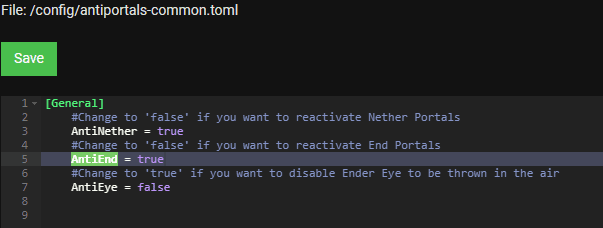
- Save changes, then restart the server. Join to confirm if that worked out.
Remember that the mod you installed must be supported on the Minecraft server. If the game versions mismatch, the server or mod will not startup properly. Additionally, the configuration file is typically located in the config directory. You may have to dig around, but should be fairly straightforward. Although, certain mods allow commands to disable the Nether or End – it depends on what you installed. Contact our Support Team if the server is no longer working after setting this up.
Frequently Asked Questions
Depending on the server type, there could be a few reasons why this is happening.
For Spigot / Paper, make sure you didn’t trigger any errors in the bukkit.yml file when disabling the End. Only change the allow-end setting to “false” and save the changes. However, plugins or datapacks could be causing issues if they directly impact both dimensions. Unless something else occurred, the server should be working after following the steps.
For Forge / Fabric, the mod you installed might not be supported on the Minecraft server. This happens when the game version doesn’t match OR the mods are conflicting with each other. Alternatively, you might have triggered errors in the configuration file when disabling dimensions. Double-check that the mod version is supported on the server, other mods aren’t conflicting, and that the config file is correctly edited.
Whether you’re on Forge or Spigot, if you did not save the changes after editing config files – then the dimension(s) will still work. Additionally, restarting the server is required to apply the changes and that includes installing mods. Failure to do so will result in this problem!
This happens when the Minecraft server isn’t running Spigot or Paper. Switch to either one from the Game File area on the main panel, then restart the server – this will generate the file. If you already have selected the right server version and restarted, then refresh the FTP File Access page. It should appear after that, as your browser’s cache might need to update.
If you don’t already have it, the Fabric API mod needs to be installed. This is required for pretty much everything, so without it the server will continue to crash. Download it from here, then install it accordingly. Sadly, there could be other reasons for the server crashes – which might be directly related to other mods or invalid config files.
Yes, but this process involves using datapacks to override the End. For instance, a datapack can transform the dimension to a void. This would effectively make it disabled. Although, you can try to experiment with datapacks that remove strongholds so no one can even activate / enter the portal. The final possible method is to use command blocks to always teleport players back to spawn whenever they touch an End Portal Block.
An example of using a command block would be this execution:
/execute as @a at @s if block ~ ~-1 ~ end_portal run tp @s 0 64 0
Disabling Dimensions in Minecraft
Disabling the End or Nether on your Minecraft server can be done in several ways, depending on your setup and preferences. While options like Spigot or Paper make the process straightforward, other server types such as Forge or Fabric may require extra steps.Even Vanilla servers have creative workarounds using datapacks or command blocks. Regardless of your method, following the correct procedure and ensuring compatibility with your server version is key to disabling the dimensions.





















