Fabric is a lightweight Minecraft mod loader that has been available since version 1.14. It supports a large catalog of mods and modpacks, particularly in the performance and quality-of-life categories. This guide covers how to install Fabric on an Apex server and Minecraft client, how to set up the Fabric API, find compatible mods on CurseForge, and troubleshoot common issues.
How to Install Fabric
- Navigate to the Apex server panel and stop the server.
- Scroll down to the JAR File section and use the menu to select the desired Fabric version.
- Generate a new world, particularly if switching to an older version.
- Restart to load Fabric onto the server.
Fabric can also be installed on a server manually if a specific version is needed. See how to install Fabric manually on a Minecraft server for more detail.
Client Installation
- Navigate to the Fabric installer download page and download the Universal installer for your operating system.
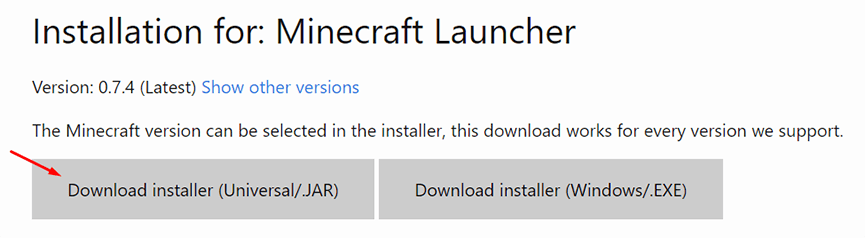
- Save the
.jarfile to a safe location and open it. - In the installer, select the desired Minecraft version and click Create Profile.
- Press Install once the settings look correct.

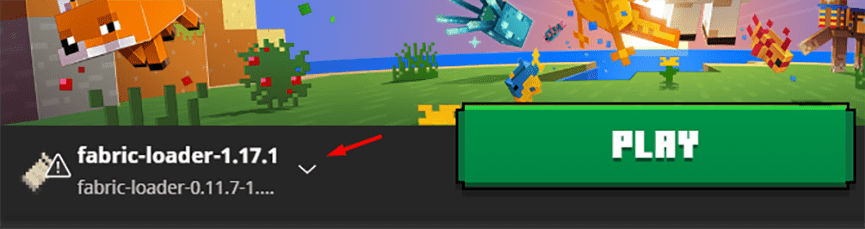
- Open the Minecraft launcher — a new Fabric profile will be available to play.
Getting Started
Fabric API
Most Fabric mods require the Fabric API to run. Install it before adding other mods.
- Go to the Fabric API CurseForge page and click Files at the top.
- Locate and download the version that matches the installed Fabric and Minecraft versions.
- Save the file — it will be uploaded alongside other mods.
Finding Fabric Mods
Fabric and Forge mods are not interchangeable. When browsing CurseForge for mods, click Files on any mod page and check the file name to confirm it says Fabric rather than Forge before downloading.

Mod Installation (Server)
- Navigate to the Apex server panel and go to FTP File Access on the left.
- Log in and open the mods folder.

- Click Upload in the top left.
- Drag and drop the Fabric API file and any other Fabric mods into the upload area.

- Once all files reach 100%, return to the main panel and restart the server.
Mod Installation (Client)
- Open the Minecraft launcher and click Installations at the top.
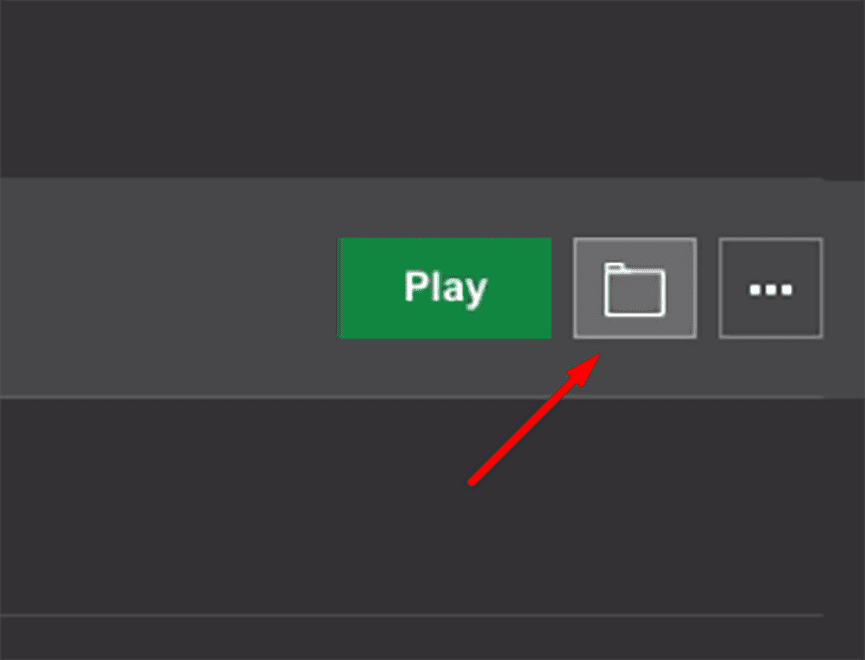
- Locate the Fabric profile and click the folder icon on the right.
- Open or create the mods folder inside the profile directory.
- Copy the Fabric API file and any other Fabric mods into the mods folder.
- Launch the Fabric profile to load the mods.
The client and server mod lists must match. A mismatch between client and server mods will cause a connection error when joining.
Common Issues
An error at startup usually means one of the mods is incompatible. Check that all downloaded mods are Fabric-compatible and match the installed game version. If a mod requires additional dependencies, check its Relations tab on CurseForge for a list.
Confirm the Fabric profile is selected in the launcher before starting the game. If the title screen does not mention Fabric, reinstall the loader and verify that mods are placed inside the correct mods folder.
A connection error when joining usually means the client and server mod files do not match. Compare the mod list and versions on both sides and correct any differences.
Conclusion
Fabric is a lightweight mod loader for Minecraft that is straightforward to install on both a server and client. After installing the Fabric API and any compatible mods, the process is the same as other mod loaders. For a mod launcher approach to Fabric modpacks, see how to install CurseForge modpacks.