



As of mid-2024, Apex Hosting no longer supports Bedrock plugin-based servers like PocketMine, Nukkit, or PowerNukkitX.We recommend using a Java Edition server with the GeyserMC plugin, which allows Bedrock players to join Java servers and use Java plugins.
If a server is already on a Bedrock Dedicated Server, you can convert it to Java Edition. However, since Bedrock and Java worlds aren’t directly compatible, the world must be converted using a tool like Chunker.
Please note that conversions aren’t always perfect and may have issues.
Overview
In Minecraft, one of the most exciting versions is Bedrock Edition. With Bedrock Edition, you can play Minecraft on your phone and your computer. Now while this version of Minecraft does have the cross-compatibility that normal Java Edition does not have, you are not able to modify the gameplay as far as you can with Java. However, with Nukkit, you can add plugins to even your Bedrock Edition server. This is a server software for Pocket Edition that does have some advantages on similar versions like Pocketmine. It is written in Java which means it is much faster and far more stable than Pocketmine. The plugins are also very up to date in this version, so you should be able to find all of the plugins you may need on your server! Nukkit can be installed with one-click on the Apex Game Panel. In this guide, we will be walking you through how you can install Nukkit on your server.
How to install Nukkit
- Head to the Apex Game Panel and stop your server.
- Locate the jar selection part of the page and click on it.
- In the search bar, type “Nukkit” or scroll down until you find it.

- Once you have it selected, click “Save” at the bottom of the panel. You are going to see a popup asking if you want to create a new world. Keep in mind that if you are moving from Java Edition, you will need to reset your world.
- Start your server back up.
How to install plugins on Nukkit
- Go to the Nukkit plugin page.
- On this page, you will see a list of plugins, when you find one that you would like, click the name of it to open the plugins page.

- To the right of the plugins name, click
Downloadto download it to your PC. - Head to the Game Panel and click
FTP File Accessto the left of the panel.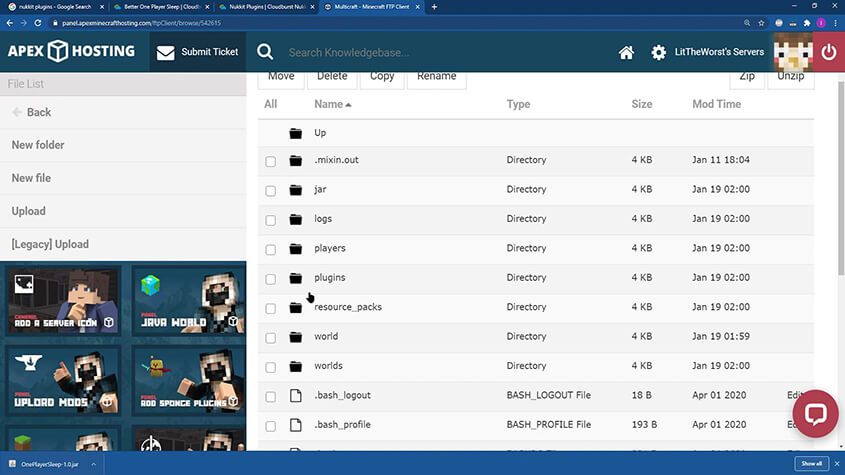
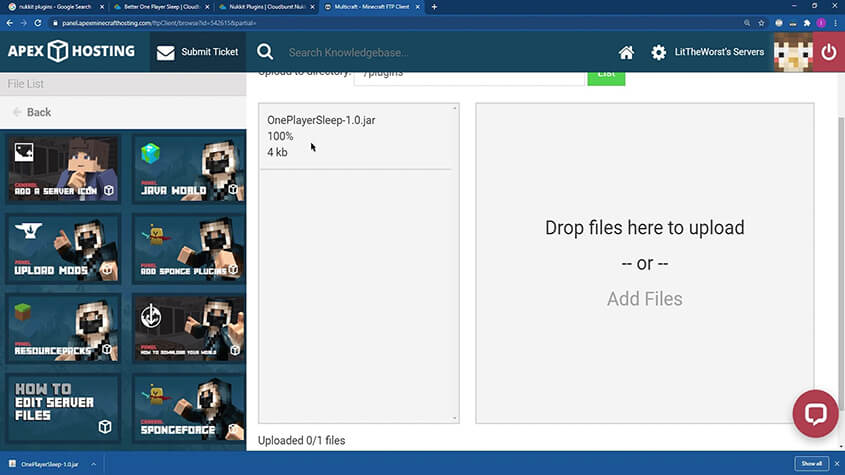
- Once you login to the FTP File Access you will see a list of your files. Open the plugins folder and click
Uploadto the top left of the page. - Drag your plugin over to the right side of the page and wait for it to reach 100%.
- Head back to the Game Panel and restart your server. The plugin should now be installed. You can check this by typing
plinto console.
Conclusion
Nukkit is the perfect solution for anyone wanting to add plugins to their Pocket Edition servers. With our one-click installer, you can easily set your server to this awesome version. Do not forget though, you can only install Nukkit plugins with this. No Bukkit plugins or mods will work on Nukkit.





















