


Vanilla Minecraft holds most players for hundreds of hours. After beating the Ender Dragon and the Wither, though, the world starts to feel familiar. Better Minecraft is the answer. Developed by LunaPixelStudios and released on CurseForge in 2020, it extends the base game with new biomes, custom dimensions, overhauled equipment systems, unique bosses, and a full quest system to guide you through it all. This guide shows you how to set up a Better Minecraft server on Apex Hosting and what to expect once you start playing.
What Is Better Minecraft?
Better Minecraft is a Forge modpack that extends every layer of the base game. The pack adds hundreds of new mobs, over a dozen custom structures, new villager types, multiple extra dimensions, and gear tiers that go well beyond diamond and netherite. A built-in quest system walks new players through the content from the first session.
The modpack comes in several releases. Better MC [FORGE] BMC1 for Minecraft 1.16.5 has over 5.7 million downloads and still receives updates. Better MC [FORGE] BMC4 for Minecraft 1.20.1 is the current main release with over 16 million downloads, offering 393 mods, 7 dimensions, and 20+ bosses. Better MC [NEOFORGE] BMC5 for Minecraft 1.21.1 is the newest variant for players who want the latest Minecraft version. All are available on Apex servers. This guide covers the BMC1 (1.16.5) installation. If you want BMC4 or BMC5, the steps are the same: select the version you want when choosing your game file.
System Requirements
Better Minecraft runs more mods than a standard Forge pack. Default memory settings in the CurseForge launcher will cause the modpack to crash on startup. Make sure you allocate sufficient memory for Better Minecraft before launching.
| Minimum | Recommended | |
|---|---|---|
| Client RAM | 6 GB allocated | 8 GB allocated |
| Server RAM | 4 GB | 6-8 GB |
| Java version | Java 17 (64-bit) | Java 17 (64-bit) |
| Storage | 3 GB | 5 GB |
For servers, 6 GB works for 2-5 players. Groups larger than that benefit from 8 GB or more to prevent chunk loading slowdowns.
Client Installation
You need the CurseForge launcher to play Better Minecraft. Install it first, then follow the steps below.
- Navigate to CurseForge and click
Downloadfor your operating system.
- Afterward, open this file to begin the launcher installation on your computer.
- Once it’s finished, startup the application and press
Browse Modpacksin the menu.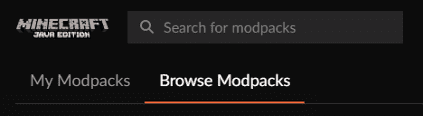
- In the Search field, type “Better Minecraft Forge” and click
Installonce found.
Note: Make sure you choose the 1.16.5 version, rather than other kinds.
- When everything is completed, press
PlayfromMy Modpacksto begin loading it.
If you run into problems during the install process, our guide on how to install modpacks via CurseForge covers additional options including alternate launchers.
Server Installation
We recommend setting up a dedicated Server Profile for Better Minecraft before you start. The pack includes a large number of mods, and keeping it isolated from other server files prevents conflicts. This is optional, but strongly recommended.
When you’re ready, follow these steps to begin the server installation process.
- Head towards your Apex server panel and locate the
Game Filearea down below. - Click on the currently selected option, revealing a menu list.
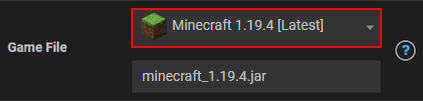
- Proceed to enter “Better Minecraft” and press on the [Forge] 1.16.5 version.

- In the following prompts, click
Change Version,Create New World, andRestart Now.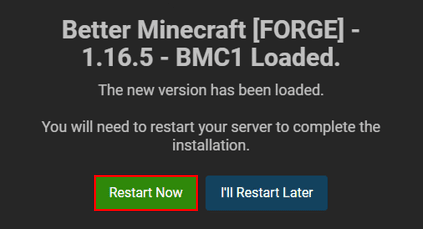
- After the server loads everything, join with your installed profile via CurseForge.
Most Better Minecraft versions work the same way in the panel. If you want BMC4 instead, search for it by name and select the 1.20.1 Forge version. If the panel installation fails, you can also manually install the server files using FTP.
Getting Started

Joining a Better Minecraft server feels different from the first seconds. New biomes appear on the horizon, unfamiliar mobs patrol the terrain, and custom structures break up the world in every direction. The changes run deep, but the game gives you a roadmap.
The Quest Book
Every player starts with a Quest Book. Open it on first load and it walks you through a tutorial covering the pack’s controls, new mechanics, and recommended starting goals. Work through the chapters in sequence. Each quest has Task Items to complete and Rewards to claim, and skipping the rewards means leaving useful starter gear on the table.

The Quest Book icon also appears in the top-left corner of your inventory for quick access. New players who skip it tend to miss key mechanics for the first few hours.
Unique Biomes

Better Minecraft adds dozens of new biomes, from dense forests with oversized trees to arid fields of giant pumpkins. Each biome spawns its own set of creatures and has resources you won’t find elsewhere. If you want to establish a permanent base in one, claim its chunks using the FTB Utilities mod included in the pack. Claimed chunks stay loaded on the server even when no players are nearby, so your furnaces, farms, and automation keep running.
New Mobs
Better Minecraft adds over 50 new creatures to the world. You’ll find passive animals like crocodiles in rivers and special wolf variants in forests, along with hostile mobs that guard specific biomes and structures.

Most hostile mobs drop basic resources when killed, making mob farms a solid early-game strategy. The Tutorial chapter of your Quest Book unlocks the Animal Dictionary, which lists the creatures you’ll encounter and what they drop.
Villagers and Trades

Villages are more active in Better Minecraft. Iron golems patrol alongside the regular population, and new job roles appear that don’t exist in the base game. Oceanographers trade ocean-related items and exploration tools. Blueprinters offer building materials and crafting components. Finding a village early gives you access to trades that would otherwise require hours of gathering. Chests inside village buildings also contain better loot than vanilla, so searching every structure is worth the time.
Structures Worth Exploring

The world generates dozens of new structure types alongside the vanilla ones. Bandit Villages are hostile and guarded. Abandoned Temples hold loot but require fighting through enemies to reach it. Lighthouses appear near coastlines and often have friendly NPCs nearby.
Early in the game, some of these structures will be harder than your current gear can handle. Explore them for the layout and come back when you’re better equipped. Chest loot scales with the structure type, so more dangerous locations tend to hold better rewards.
Gathering Resources

Standard Minecraft ores are still present, but Better Minecraft adds new minerals across the Overworld and extra dimensions. The JEI mod (Just Enough Items) shows every recipe in the pack directly from your inventory. Search for any item to see what it crafts into, what materials it requires, and where those materials come from. Use it constantly in the early game to plan which resources to prioritize.
Most advanced gear requires materials from dimensions you won’t reach until mid-game. Focus on iron and stone tools first, then work through the Quest Book chapters to identify which ores unlock the next equipment tier.
Equipment and Armor Tiers

Better Minecraft adds multiple gear tiers above netherite. Items made from custom materials carry passive bonuses. The Crystalite Helmet, for example, provides knockback resistance on top of its base armor rating. Other pieces increase damage output, grant speed bonuses, or add utility effects.
Most top-tier equipment requires materials from the Nether, End, or custom dimensions. Early-game, treat the vanilla tiers as stepping stones and use the Quest Book reward system to bridge the gaps between them.
Waystones
Waystones are craftable fast-travel points you can place anywhere in the world. Set one up at your base, then scatter others across locations you visit frequently.

Waystones can be set to private (only you) or global (everyone on the server). This lets you keep your base location private while giving other players access to shared waypoints like spawn or communal farms. For multiplayer servers, waystones solve the biggest friction point in the early game: getting back home after a long exploration run.
Upgraded Netherite

The Upgraded Netherite mod extends the netherite gear system with new ingot types. Golderite, Blazerite, Enderite, Prismarite, and Witherite each upgrade standard netherite gear differently. Some upgrades require a crafting table. Others need a smithing table. The result is netherite armor and tools with stronger durability ratings and passive effects, including magnet-like item attraction with certain combinations.
Upgraded netherite gear sits between standard netherite and the full custom equipment tiers. It’s the recommended mid-game target before entering advanced dimensions.
Dimensions and Bosses
Bosses to Fight

The Mowzie’s Mobs mod (version 1.8.2 as of March 2026) adds major bosses across every dimension. In the Overworld, the Ferrous Wroughtnaut spawns underground as a heavily armored knight. It wields a massive axe and uses a slam attack that gets the weapon stuck in the ground. That moment is your window to hit its exposed weak point. Nether and End bosses appear later in progression. Each boss has its own attack patterns and drops unique loot you cannot get anywhere else. Bring friends. These fights are designed for groups.
Twilight Forest
The Twilight Forest is an extra dimension worth visiting before you push into the end game. It generates enormous trees, dense vegetation, abandoned structures, and mid-game boss encounters harder than anything in the standard Overworld.

To open the portal, dig a 2×2 water hole and surround it with 12 different flowers. Throw a diamond into the water to trigger the portal. Make sure your gear is solid before entering. The Twilight Forest has its own progression system, and entering unprepared means dying close to the portal.
The Abyss

The Abyss is Better Minecraft’s endgame dimension, accessible only after completing the End chapter in your Quest Book. The chapter gives you the materials needed to build the portal. Inside, the Abyss is hostile from the moment you arrive. Large spiders and dimension-specific creatures spawn immediately.
The difficulty is the point. The Abyss contains some of the best weapons, tools, and armor in the entire pack. Complete the End chapter, gather the portal materials, and treat the Abyss as your final goal rather than a shortcut.
Troubleshooting
Check two things first: your IP address and your modpack version. The server IP and port appear near the top of your Apex panel. If you’re using a subdomain, double-check that it’s entered correctly in-game. Second, confirm you’re running the same version of Better Minecraft as the server. If the server runs BMC1 Forge 1.16.5, every player connecting must have that exact version installed.
If the modpack fails to load correctly on your server, go to the Game File section in the Apex panel and confirm Better Minecraft and the correct version number are selected. Then generate a new world and restart the server. If you installed the pack into an existing Server Profile rather than a fresh one, internal file conflicts may be causing the problem. Create a new Server Profile and reinstall.
Better Minecraft puts significant load on servers. If performance is poor, start with our modded server optimization guide for specific settings and mod adjustments that reduce server load. If performance doesn’t improve, your current plan may not have enough memory for the number of players on your server. Contact Apex support for advice on the right plan for your setup.
Frequently Asked Questions
Better MC [FORGE] BMC4 for Minecraft 1.20.1 is the current main release with over 16.4 million downloads, with the most recent update (v57.5) released in March 2026. Better MC [NEOFORGE] BMC5 for Minecraft 1.21.1 is the newest variant for players who want the latest Minecraft version, with the most recent update arriving in early April 2026. The version covered in this guide, BMC1 (Forge 1.16.5), still receives updates and has over 5.7 million downloads.
The client requires at least 6 GB of RAM allocated in the CurseForge launcher. 8 GB is the recommended target for a stable experience. Server RAM requirements start at 4 GB and scale with player count.
Yes. The installation steps are the same. Install the pack via CurseForge and launch it from My Modpacks. No server setup needed for solo play.
The modpack itself is free on CurseForge. The individual mods it contains are also free. You need a paid Minecraft Java Edition license and a free CurseForge account to download and play it. A paid Apex Hosting server plan is required to host it for multiplayer.
Better Minecraft (BMC1) includes over 200 mods. Key ones include Mowzie’s Mobs, Twilight Forest, Upgraded Netherite, Waystones, FTB Utilities, JEI (Just Enough Items), and More Villagers, among many others. The full mod list is on the CurseForge pack page.






















