TerraForged replaces Minecraft’s default world generation with realistic terrain, sculpted mountain ranges, flowing rivers, and overhauled biomes. Installing it on a server lets everyone on the world benefit from the new generation without needing separate configuration — provided they all have the mod on their client.
How to Download
- Navigate to TerraForged on CurseForge, then click Files near the top.

- Locate your desired game version in the list.
- Click the three vertical dots next to that version and select Download File.
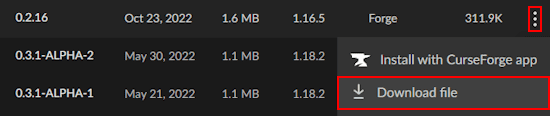
- Save the
.jarfile somewhere accessible on your computer.
Client Installation
TerraForged is a Forge mod, so Forge must be installed on your launcher before adding it. See How to Install Forge on Minecraft if you haven’t done this yet.
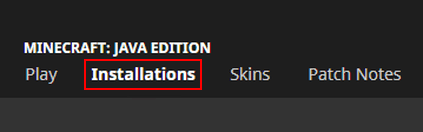
- Open your Minecraft launcher and click Installations at the top.
- Find your Forge profile and click its Folder icon.

- Open the
modsfolder in the window that appears. - Drag and drop the downloaded TerraForged
.jarfile into the folder. - Return to the launcher and load Minecraft using your Forge profile.
TerraForged Server Setup
The server must run Forge to support TerraForged. See Setting Up a Minecraft Forge Server before following the steps below.
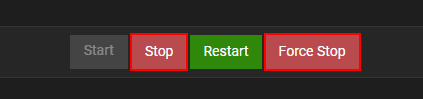
- Go to the Apex server panel and stop the server.
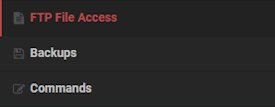
- Click FTP File Access in the left menu and log in.
- Open the
modsfolder. - Click Upload in the top-left corner and drag the TerraForged
.jarfile into the upload area. - Once the upload reaches 100%, return to the main panel.
Modbox Installation
As an alternative to the manual installation, you can install TerraForged on your server using Modbox, our built-in mod browser with direct CurseForge integration.
- Log in to your Apex Hosting account and open your Minecraft server panel.
- On the left side, select
Server Configuration > Modbox.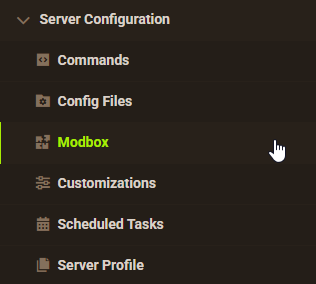
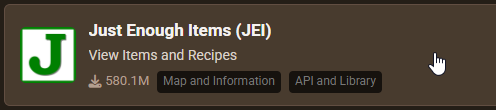
- Search for the mod you want and open its mod page.
- Select the recommended version for your server, then click
Install.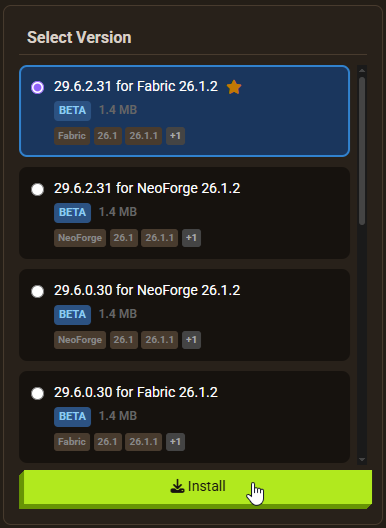
Note: Modbox automatically matches mods to your server's installed version, but does not install dependencies automatically. For more details on using Modbox, check out our full Modbox guide.
TerraForged has no required dependencies. However, installing the mod alone isn’t enough — you still need to set the Level Type to terraforged in Config Files and generate a new world, as covered in the section below, regardless of which installation method you use.
Generating a New World
If you don’t already have a TerraForged world, you need to set the level type before generating a new one. Without this step, the server generates a standard vanilla world and no TerraForged terrain will appear.
- From the main panel, click Config Files in the left menu.
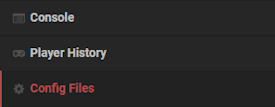
- Open Server Settings and locate the Level Type field.
- Set the value to
terraforged(all lowercase, no spaces or extra characters).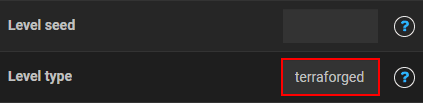
- Click Save, then select Create New World when prompted.
- Restart the server to generate the new world.
Getting Started


Once connected to the server, the terrain change is immediately visible at spawn. Most biomes are replaced or heavily modified, though a few vanilla biomes remain. To quickly find specific biomes or terrain types, use /terra locate — this requires operator privileges or cheats enabled.
Realistic Terrain


Mountains in TerraForged form with gradual slopes rather than abrupt vertical spikes. Granite and other stone types replace grass on higher elevations, making mountain faces a natural source of coal and iron. Plains become genuinely flat, making them ideal for large builds. The terrain transitions gradually between biomes, so borders feel natural rather than abrupt.
Better Rivers


Rivers flow continuously with realistic height variations, making them navigable by boat from source to sea. They include additional blocks typical of riverbanks and connect smoothly between biomes rather than cutting off at borders.
Enhanced Forests


Every forest type is redesigned. Trees are taller and more varied, and undergrowth includes grass patches, dirt variations, and large bushes. Flower forests mix birch trees with dense flower coverage, providing an accessible source of dyes. Jungle-style forests have moderate tree sizes rather than the extreme heights of vanilla jungles, making wood farming straightforward. TerraForged also supports other biome mods, so additional forest types from mods like Biomes O’ Plenty will blend into the generation naturally.
Unique Biomes


Beyond modified vanilla biomes, TerraForged generates genuinely new terrain types: stone spike forests, badland islands with exposed gold, and other unusual formations. These appear rarely across the world and are worth seeking out. TerraForged’s built-in compatibility with other biome mods means third-party terrains blend into the world rather than creating awkward borders.
Common Issues
If you cannot connect to the server, verify that TerraForged is installed in the mods folder on your client and that your launcher is using the correct Forge profile. The server also needs Forge selected as its game file type in the panel’s JAR File dropdown. If the connection fails with a GL error, update your graphics drivers or allocate more memory to the Minecraft launcher. Removing or updating Optifine and other client-side mods may also resolve the issue.
If the world loads with vanilla terrain, check the Level Type field in Config Files > Server Settings. The value must be exactly terraforged with no capitals, spaces, or extra characters. After correcting it, save, generate a new world, and restart. If other biome mods are installed, they may conflict with TerraForged’s generation — remove them temporarily to confirm compatibility.
TerraForged’s world generation is more complex than vanilla, which can cause lag when many chunks are loading simultaneously. If the server is lagging, reduce the number of installed mods and review your server’s view distance setting. On the client side, performance mods such as AI Improvements or RandomPatches can help. If lag persists, contact the Apex support team for server-specific assistance.
Frequently Asked Questions
Yes. TerraForged has built-in compatibility for most biome mods, including Biomes O’ Plenty. The two generation systems blend together rather than creating sharp borders.
No. TerraForged only applies to newly generated chunks. Existing chunk data in a world already in use will not change. To use TerraForged terrain, you need to generate a new world with the level type set to terraforged.
No. TerraForged is a Forge mod and only works on Forge servers. Spigot and Paper servers do not support Forge mods.
Next Steps
With TerraForged installed, set the level type to terraforged, generate a new world, and restart the server. Use /terra locate to find specific biomes quickly. For an expanded experience, add a compatible biome mod like Biomes O’ Plenty — TerraForged will blend the additional terrains into its own generation.
Helpful Links
- TerraForged on CurseForge
- How to Install Forge on Minecraft
- Setting Up a Minecraft Forge Server
- Biomes O’ Plenty Mod Guide