Overview
One of the best things about a Minecraft Server is being able to customize it past Vanilla Minecraft. Adding plugins is just the way to do it, and a great way to bring life to your server is with Citizens, a Minecraft plugin that enables the creation of NPCs (Non-Player Characters) in your server. Some use it for design as you can bring NPC’s in the game as your skin, your friends, or maybe even as Notch or Herorbine. Some use NPC’s as shops, information providers, teleporters. This plugin is a great asset and we will be teaching you how you can get it on your server.
When downloading Citizens, you will also need to download the plugin Vault. If you do not download this plugin, Citizens will not work.
Installation
Note: Citizens requires the Vault dependency to function properly. Install it first using either method below, then return here to continue.
Modbox Installation
IMPORTANT: Make sure to have Spigot or Paper selected in the Game File option on your server panel so plugins can work properly.
- Head towards your Apex server panel for the server.
- Navigate to
Server Configuration > Modboxon the left.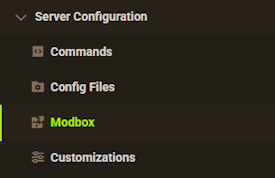
- Choose the version and search for the plugin you want, then select it.
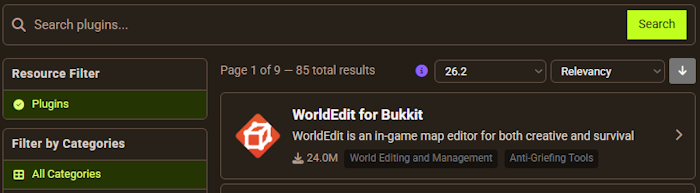
- Click
Installon the left and wait for it to be installed. - Restart the server to load the plugin. Repeat this process for any other plugins.
Manual Installation
Download Citizens on Bukkit or Spigot and follow these steps:
- Download the plugin file from the link above.
- Head towards your Apex server panel for the server.
- Locate the Game File option, then select Spigot or Paper if you haven't already.
- Navigate to
File Management > FTP File Accessand login. - Drag + drop the .jar file in the
pluginsdirectory. Alternative: Click theUploadbutton and select the file. - Wait for this to finish, then return to the main panel.
- Restart the server and the plugin should load properly once you join.
How to use Citizens
Commands
Nearly every aspect of Citizens is controlled in-game through commands.
/citizens: Shows basic plugin information
/citizens help: Help page for the plugin, using a page number to follow it will advance
/npc help: Show all of the NPC help menu and commands necessary to help with creation.
/npc create: You can use this command to create an NPC.
/npc select: If you type this command while looking at an NPC, it will select it.
/trait help: Shows all of the different applicable traits for the NPC you have created.
/template help: Allows you to create different NPC templates to apply so you don’t have to continue to use a multitude of commands each NPC.
You can find a list of every command here.
What Citizens can be used for
This plugin can be used for a variety of different tasks, the ones that are most common are as follows:
- Shopkeepers: NPCs can be used as a shopkeeper meaning that players can buy or sell items to them depending on server prices that you’ve set using a separate shop plugin.
- Quest: NPCs can also be used with various questing plugins that allow you to have them perform different duties or dialogue related to a quest.
- Decoration: Often times NPCs may simply be used as decoration to make an area appear more populated or realistic.
- Info Boards: Some servers, such as our mcMMO gametype server may use NPC’s to relay information to a player or to perform a specific command.
These are by no means the only things NPCs from Citizens can be used for but are just a few ideas to inform of common usage.
Conclusion
On nearly every server you play on, you will probably see NPC’s. With endless possibilities, Citizens is a plugin that can fit into almost any server. Whether you are using it for decoration, information, quest, or one of the other many uses, Citizens is the perfect way to liven up your gameplay experience.
This plugin is only compatible with Bukkit, Spigot, or Paper servers. You will not be able to use it on modded Minecraft or Vanilla. You can find a guide on changing your server version here. Do not forget that with plugin you will need to download Vault.
Similar Plugins
EssentialsX
NametagEdit
Vault
CommandNPC
Useful links
https://www.spigotmc.org/resources/citizens.13811
https://wiki.citizensnpcs.co/Commands