


Minecraft offers various ways to enhance your gameplay through enchantments and potions, but many players seek a more permanent and customizable progression system. This is where Fabled (formerly known as ProSkillAPI) comes in! Fabled is a comprehensive RPG engine that allows server owners to create custom classes, complex skills, and unique attributes without touching a single line of code.
By utilizing a powerful browser-based editor, you can design a full RPG experience. Whether you want simple passive stat boosts or multi-stage magic spells, you’re in full control. In this Apex Hosting guide, we will show you how to install and use Fabled on your Minecraft server!
Modbox Installation
IMPORTANT: Make sure to have Spigot or Paper selected in the Game File option on your server panel so plugins can work properly.
- Head towards your Apex server panel for the server.
- Navigate to
Server Configuration > Modboxon the left.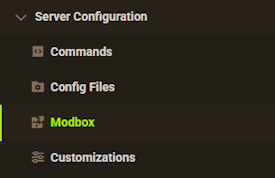
- Choose the version and search for the plugin you want, then select it.
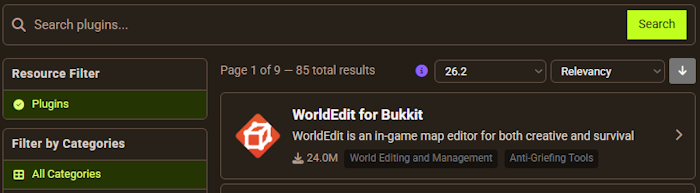
- Click
Installon the left and wait for it to be installed. - Restart the server to load the plugin. Repeat this process for any other plugins.
Manual Installation
Download Fabled on Bukkit or Spigot and follow these steps:
- Download the plugin file from the link above.
- Head towards your Apex server panel for the server.
- Locate the Game File option, then select Spigot or Paper if you haven't already.
- Navigate to
File Management > FTP File Accessand login. - Drag + drop the .jar file in the
pluginsdirectory. Alternative: Click theUploadbutton and select the file. - Wait for this to finish, then return to the main panel.
- Restart the server and the plugin should load properly once you join.
Introduction to the Web Editor
Instead of editing YAML files, Fabled uses a revolutionary Web Editor to handle configuration. Within this editor, you can visually build your RPG’s logic.

- Skills Tab: Define abilities, their costs, and their visual effects.
- Classes Tab: Create progression paths (e.g., Warrior, Mage) and assign skills.
- Attributes: Edit or create new attributes like dexterity, strength, and intelligence.
Creating a Skill
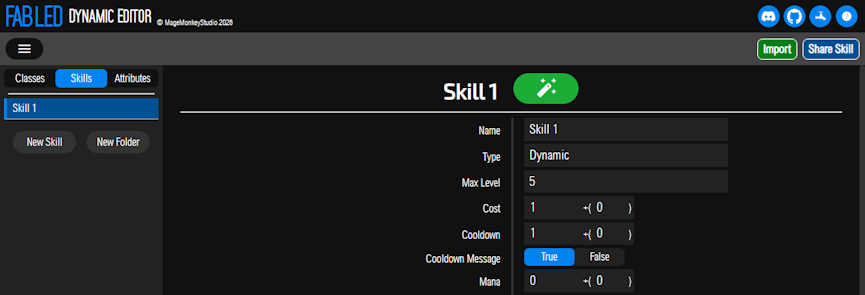
From the editor, go to the Skills tab and click New Skill.
| Option | Description |
|---|---|
| Name | The display name of the skill. |
| Max Level | The highest level a player can upgrade the skill to. |
| Cost | Skill points required to unlock or upgrade. |
| Cooldown | The wait time between uses in seconds. |
| Mana | The mana cost required to cast the skill. |
| Icon | The Minecraft item used to represent this skill in menus. |
Creating a Class
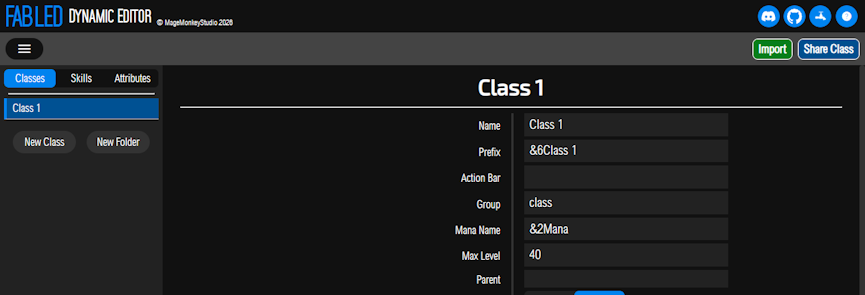
Switch to the Classes tab to define how players progress.
| Option | Description |
|---|---|
| Name | The name of the class (e.g., Warrior). |
| Prefix | The chat prefix for players in this class (supports color codes). |
| Max Level | The level cap for this specific class. |
| Exp Sources | Select what actions (Kill Mob, Quest, Mining) grant experience. |
| Health/Mana | Set the base amount and the increase per level. |
Creating an Attribute
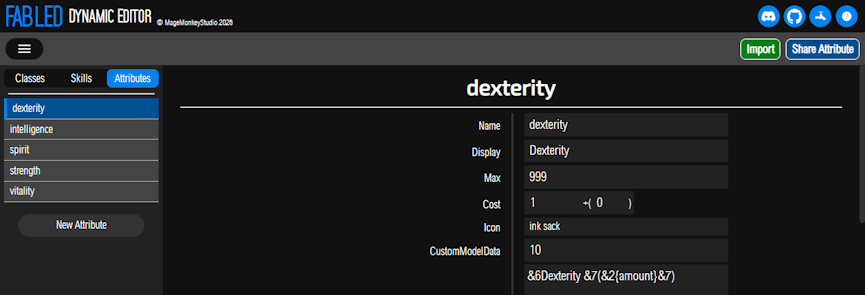
Navigate to the Attributes tab to edit or create player effects.
| Option | Description |
|---|---|
| Name | The internal name used by the plugin. |
| Display | The name shown to players in GUIs and lore. |
| Max | The highest level this attribute can reach. |
| Cost | Points required to upgrade this attribute. |
| Icon | The Minecraft item (e.g., Ink Sac for Dexterity) used in menus. |
| Target Modifiers | Use mathematical formulas to link the attribute level to other mechanics. |
Importing to Your Server
Once you have finished designing your content in the editor, you must move it to your server.
Exporting from the Editor
- In the Web Editor, click the
Backup All DataorDownloadbutton. - This will generate skills.yml, classes.yml, and attributes.yml files.
- Save these files somewhere easily accessible on your computer.
Uploading via FTP
- Head towards your Apex server panel and stop the server.
- Navigate to
File Management > FTP File Accesson the left. - Login with your password, then enter:
/plugins/Fabled/dynamic - Upload your new skills, classes, and attributes files in this folder.
- Return to the main panel and start up the server.
In-Game Usage
Once the plugin is loaded, players can interact with the RPG system using these primary commands:
/class options– Opens a GUI to view available classes./class profess [ClassName]– Joins the specified class./class skill– Opens the skill tree GUI to spend skill points./class customize– Allows admins to visually design the in-game menus./class cast [SkillName]– Manually triggers a skill.
Conclusion
With Fabled, your server is no longer limited by standard Minecraft mechanics. You can create a unique and scaling RPG environment that keeps players engaged for hours. Whether you are building a simple level system or a complex world with hundreds of custom spells, Fabled provides the tools necessary to make it a reality. Get started today 👏






















