


Standard Minecraft survival servers let players die as many times as they want with no real penalty. The LifeSteal SMP Plugin changes that by tying each player’s maximum health directly to their kill-death record. Every time you die in PvP, you permanently lose a heart. Every time you kill another player, you steal one of theirs. When someone reaches zero hearts, they are eliminated from the server entirely and the only way back is through a Revive Beacon crafted by another player.
The LifeSteal SMP Plugin runs on Spigot and Bukkit-based servers. The format gained recognition through the Lifesteal SMP YouTube series, which features creators including ClownPierce and SB737 and has run through Season 7. If you want to run a survival server where every fight carries real consequences, this guide covers installation and setup on your Apex Hosting server.
Modbox Installation
IMPORTANT: Make sure to have Spigot or Paper selected in the Game File option on your server panel so plugins can work properly.
- Head towards your Apex server panel for the server.
- Navigate to
Server Configuration > Modboxon the left.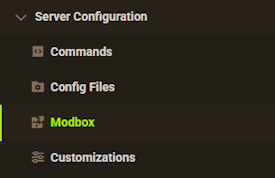
- Choose the version and search for the plugin you want, then select it.
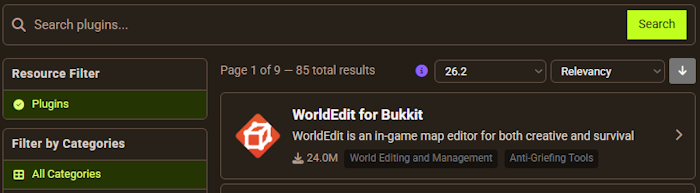
- Click
Installon the left and wait for it to be installed. - Restart the server to load the plugin. Repeat this process for any other plugins.
Manual Installation
Download Lifesteal SMP on Bukkit or Spigot and follow these steps:
- Download the plugin file from the link above.
- Head towards your Apex server panel for the server.
- Locate the Game File option, then select Spigot or Paper if you haven't already.
- Navigate to
File Management > FTP File Accessand login. - Drag + drop the .jar file in the
pluginsdirectory. Alternative: Click theUploadbutton and select the file. - Wait for this to finish, then return to the main panel.
- Restart the server and the plugin should load properly once you join.
Before downloading, confirm your server runs Spigot or a Bukkit-based server type. The LifeSteal SMP Plugin does not support Paper or its forks. If you are unsure how to change your server type, see the guide to adding plugins to your Minecraft server for full setup instructions.
How LifeSteal SMP Works
When the plugin first loads, gameplay looks identical to standard survival. The difference shows up the moment someone dies. Each PvP death costs the losing player one heart and transfers it to the killer. Hearts lost this way are permanent until earned back through crafting or admin commands.
A player who reaches zero hearts is eliminated and locked out of the server until someone revives them. This creates pressure that standard survival servers cannot match: dying to monsters costs nothing under default settings, so all the real stakes sit in PvP encounters. The format is the basis for the Lifesteal SMP YouTube series, now in Season 7 with an active player community.
Three mechanics define the experience: the heart system, craftable hearts, and the Revive Beacon.
Hearts
As previously mentioned, losing hearts is the primary feature from the plugin. This makes surviving more challenging for everyone, which can lead to interesting gameplay sessions. For example, if one person loses too many hearts, they’ll die and become eliminated from the server. Another instance is when someone kills a player to steal their heart, thereby the victim loses a life.

Heart Crafting Recipes

In cases where you’ve lost hearts and are on the verge of being eliminated, consider crafting extra ones. The recipe is rather expensive though, as it requires x1 Totem of Undying and x8 Redstone Blocks. However, this only crafts a Heart Fragment and not a full heart. Repeat this process until you have four pieces of them or until you’re satisfied with the amount.
Totems are easiest to farm through raid drops. In the 1.21 update, you can trigger raids using ominous bottles obtained from pillager outpost captains, making totem farming more accessible than in earlier versions.
Once you’ve crafted enough Heart Fragments, you’ll need more expensive materials to make a Full Heart. Collect x4 Diamond Blocks and x1 Netherite Ingot for the remaining recipe items. Afterwards, you will only receive one extra heart, allowing you to add it on your health bar via right-clicking. Due to the expensive required materials, avoid unnecessary fights with hostile mobs or other players where possible.

Otherwise, you may suffer more in the long term since crafting extra hearts takes a lot of resources. Run /LSrecipe in-game to view all current crafting recipes without checking external documentation.
Revive

On the topic of survival, players will need to constantly survive without death when the LifeSteal SMP Plugin is enabled. This is due to them having a limited amount of lives, as mentioned before. Once a character is eliminated from the world, another person is required to revive them through a Revive Beacon or other means. When the user is revived, they can join the world without any rejections to continue playing. This is an essential aspect to LifeSteal, as it’s the punishment for dying in the server.

Luckily, the beacon is craftable by anyone on the server, with the only downside being that it’s expensive. It requires netherite ingots and, of course, a beacon. After it’s been created, players can right-click while holding it to open a GUI. This menu allows for them to revive specific people, meaning teams can form and some could purposely avoid reviving others.
Server operators can also skip the crafting process entirely using the /LSrevive command, which revives any player immediately.
Commands
Whether you’re wanting admin control or authorizing players to use some features, LifeSteal SMP Plugin commands do these and more. There aren’t many of them, but are very useful to server owners and others.
| Command | Permission | Description |
|---|---|---|
| /LSwithdraw | lssmp.withdraw | Removes a heart from your character, but gives an Extra Heart item instead. |
| /LSversion | lssmp.version | Returns the plugin’s development version. |
| /LSrevive [username / all] | lssmp.revive | Instantly revive a player or all players. |
| /LSreset [username / all] | lssmp.reset | Resets all hearts for a person or everyone. |
| /LSreload | lssmp.reload | Reloads the plugin into the server to apply recent file changes. |
| /LSlanguage | lssmp.language | Select the language of the plugin. |
| /LShealth [add / get / set / sub] [username] [hearts] | lssmp.health | Choose to either add, get, set, or subtract health from a player. |
| /LSeliminate [username / all] | lssmp.eliminate | Eliminate a user from the world, but retains their lives. |
| /LSchangelog | lssmp.changelog | View the changelog of the plugin’s update. |
| /LSgive [item] [amount] [username] | lssmp.give | Give a plugin item to a player. |
| /LSrecipe | lssmp.recipe | Displays all recipes for plugin items. |
/LShealth is the most practical command for server management. Use it to correct a player’s heart count after a bug, or to rebalance players who have accumulated too many hearts. /LSeliminate removes a player from the game without clearing their heart total, which is useful for temporary removals during server events.
Configuration
Inside of your server’s FTP panel where the plugin was uploaded, there’s a LifeSteal-Smp-Plugin folder that contains a config.yml file. This holds core settings for the plugin, such as max health, starting hearts, and allows for customization with messages, among other features. Tweaking the configuration file is how you find exactly what works best for the server.

Key settings to review before your server goes live:
- Starting hearts — the heart count each new player begins with
- Max hearts — the ceiling on how many hearts any player can hold
- Hearts per kill / death — how many transfer in each PvP encounter
- Natural death behavior — whether mob deaths also cost hearts
After editing config.yml, run /LSreload in-game to apply changes without a full server restart. For community support and config help, join the plugin developer’s Discord server.
Common Issues
If after installing the LifeSteal SMP Plugin and it doesn’t work, then make sure that it’s located in the correct server profile and directory. For instance, if you had a saved server profile with the plugin that wasn’t for Minecraft, then it’d pose issues. As for the location, it’s supposed to be in the plugins folder. Even if it’s in there, make sure to Restart the server afterward to ensure it loads. If it still isn’t working, then make sure the version and type of the server supports the plugin. The LifeSteal SMP Plugin requires a Spigot or Bukkit-based server and does not support Paper. If your server is currently running Paper, switch to Spigot in the Game File settings before attempting to run the plugin.
When a player dies in-game and has no more lives to spend, they’ll be faced with total elimination from the server. It forces them offline and wouldn’t be able to join without being revived. If you or anyone else is experiencing this problem and want to reverse it, then use the /LSrevive [username] command. Otherwise, craft a Revive Beacon and interact with it for the revival.
After making file changes to the plugin, make sure to click Save and Restart the server. Alternatively, you can use /LSreload in-game to relog the plugin’s files. If these don’t work, then your last resort would be to Force Stop the server from the panel and make the file changes, then Restart the server.
Frequently Asked Questions
What server type does the LifeSteal SMP Plugin require?
The plugin requires Spigot or a Bukkit-based server. It does not work on Paper or its forks. If your server is currently running Paper, change the server type to Spigot in the Game File section of your Apex panel before installing.
How do players get more hearts without killing?
Craft a Full Heart using Heart Fragments. Each fragment requires one Totem of Undying and eight Redstone Blocks. Four fragments plus four Diamond Blocks and one Netherite Ingot produce a single Full Heart. Run /LSrecipe in-game for the visual recipe layout.
How do you revive an eliminated player?
A server operator can use /LSrevive [username] immediately. Any player can also craft a Revive Beacon using netherite ingots and a beacon, then right-click it to open the revival GUI and select the eliminated player.
What Minecraft versions does the plugin support?
Version 2.3.x of the LifeSteal SMP Plugin supports Minecraft 1.18 through 1.21. Check the listed version on the SpigotMC resource page before downloading to confirm compatibility with your server version.
Can the heart loss per death be adjusted?
Yes. The config.yml file controls how many hearts transfer per kill and how many are lost on death. Edit the values, save the file, then run /LSreload to apply without restarting.
The LifeSteal SMP Plugin turns any Spigot survival server into a persistent competition where every death costs something real. Installation takes a few minutes, and config.yml gives you enough control to tune the difficulty for your group. Start with default settings, run a few sessions, then adjust the starting heart count and maximum cap based on how your players respond. For a full SMP setup before adding the plugin, the guide to making a Minecraft SMP server covers the complete process. For more plugin options, see the recommended Minecraft plugins list.
Useful Links
- How to Setup a Spigot Server
- LifeSteal SMP Plugin on SpigotMC
- How to Add Plugins to Your Minecraft Server
- Recommended Minecraft Plugins






















