Overview
Playing on a Minecraft server can be a fun time, as individuals will interact with each other constantly. Whether it is a friendly chat or challenging each other in minigames, it is dependent on all players behaving and following the rules. Oftentimes, some players will try to skirt around this through the use of exploits and various cheats to obtain an upper-hand. From PvP hacks to survival flight, these are often a detriment for server owners. Luckily, NoCheatPlus, an anticheat plugin, is here to save the day. With various detection systems, automatic banning of players using cheats, and more, your server will once again become a safe place for all. Installing plugins is made easy with our Apex Hosting panel page, so we have created this tutorial to help you get started.
Installation
Note: NoCheatPlus works best alongside the ProtocolLib plugin, which improves its detection capabilities. It’s recommended to install it first using either method below, then return here to continue.
Note: While NoCheatPlus has been tested up to 1.12, it should still function as intended for later versions. For best functionality, focusing on 1.12 or earlier versions is recommended.
Modbox Installation
IMPORTANT: Make sure to have Spigot or Paper selected in the Game File option on your server panel so plugins can work properly.
- Head towards your Apex server panel for the server.
- Navigate to
Server Configuration > Modboxon the left.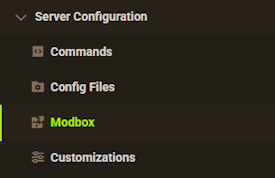
- Choose the version and search for the plugin you want, then select it.
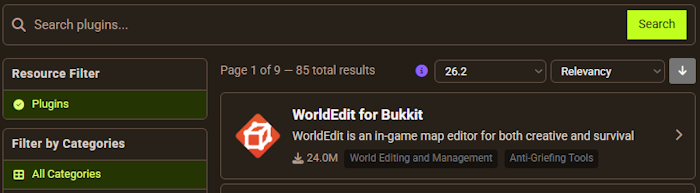
- Click
Installon the left and wait for it to be installed. - Restart the server to load the plugin. Repeat this process for any other plugins.
Manual Installation
Download NoCheatPlus on Bukkit or Spigot and follow these steps:
- Download the plugin file from the link above.
- Head towards your Apex server panel for the server.
- Locate the Game File option, then select Spigot or Paper if you haven't already.
- Navigate to
File Management > FTP File Accessand login. - Drag + drop the .jar file in the
pluginsdirectory. Alternative: Click theUploadbutton and select the file. - Wait for this to finish, then return to the main panel.
- Restart the server and the plugin should load properly once you join.
Usage
Once the plugin is installed, it will begin working automatically! ProtocolLib allows the plugin to function even better, keeping an eye on each player and preventing some of the most common server exploits.
Notable Features
- Prevents illegal flying
- Enforces fall damage
- Prevents tracking players
- Prevents invulnerability.
- Enforces normal turning speeds.
- Prevents item spam
For a full list of the many features included in the plugin, consider visiting the NoCheatPlus Wiki page.
Configuration
- From the Apex panel, stop the server, then return to the FTP File Access.
- Enter the
Pluginsfolder, followed by theNoCheatPlusfolder. - Find the
config.ymlfile, then pressEditto the far-right.

There are many options to configure for your needs. This includes blocking certain commands, toggling the checks for various cheats, logging options, and much more. Simply make any changes you desire, making sure to keep the existing format. Once you have made your changes, save the file, then restart the server.
Notable Commands
| Command | Description |
|---|---|
| /ncp reload | Reloads the configuration file for NoCheatPlus. |
| /ncp notify on/off | Toggles the in-game alerts from NoCheatPlus. |
| /ncp info [Player] | Display the violation levels of a specified player. |
| /ncp lag | Shows info relating to server-sided latency. |
| /ncp exempt [Player] [Check-Type] | Exempts a player from being detected by NoCheatPlus. |
| /ncp unexempt [Player] [Check-Type] | Removes an exemption from NoCheatPlus detection. |
| /ncp commands | A more detailed list of commands. |
Common Issues
The plugin is not working:
If the plugin is not working, ensure you are running a plugin-compatible server version such as PaperMC or Spigot. If it is still having issues, use the /plugins command from in-game to check the status of the plugin. If NoCheatPlus does not appear, ensure it is installed directly into the plugins folder. Otherwise if it is listed in red, it may not be fully compatible with your version. After making the necessary adjustments, restart the server to try again.
My configuration keeps resetting after making changes:
While you can occasionally edit config files while the server is running, we recommend shutting down the server entirely to prevent your changes from being overwritten. If issues are still occurring, make sure that you are formatting the file correctly. Any missing spaces, punctuation, and more could cause the file to break upon startup. Once this is done, save the file, then restart the server.
Helpful Links
NoCheatPlus Spigot Page
ProtocolLib Spigot Page
NoCheatPlus Wiki