


Diving into the mystical Fae Realms of Nightingale is an adventure, but sharing that journey with friends takes it to a whole new level. With Apex Hosting, setting up your own server is a piece of cake! Quickly set up a password, become an admin, change the difficulty, manage your players, and more. Collaborate with others and face the dangers of the Faewilds together – all on your own Nightingale server. Whether you want to enable cheats to spawn items or reset the world after summing tons of enemies, the possibilities are endless. In this guide, we’ll break down all the basics of hosting your server.
How to Join a Nightingale Server
Ready to step into your very own Fae Realm? Joining your server is the first step of your cooperative adventure. All you need is your server’s IP address from your control panel.
- Head towards your Apex server panel, then find your IP Address:Port and copy it.

- Launch Nightingale and select “
Play” from the main menu. - Choose your character and click “
Select Character”, then press “Join a Game”. - Proceed to click “
IP/LAN” from the Connection Type dropdown menu.
- Paste your IP Address and Port accordingly in the text fields.
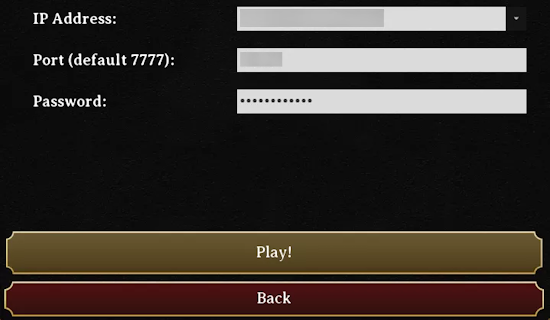
- Afterwards, click “
Play” to join the server!
How to Add Admins on a Nightingale Server
To take full control of your server, you’ll need to enable cheats and grant yourself admin access. This allows you to use special commands to manage players and the game world.
- Open Steam, right-click Nightingale and select Properties.
- Under Launch Options, type “
-enablecheats” in the text field.
- Head towards your server panel, then click Customizations on the left.
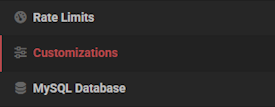
- Proceed to change the Admin Password to anything you want.

- Restart the server to apply these changes, then join in-game.
- Open the menu by pressing ESC while in-game, then click “
Admin Mode: OFF”. - Continue to enter the Admin Password and press “
Confirm” at the bottom.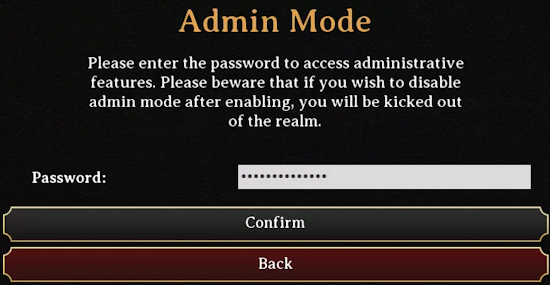
- You’re now admin! Return to the game by closing the menu.
To remove admin access, simply select Admin Mode: ON from the menu and click Confirm. The player will need to rejoin the server for the change to take effect.
How to Kick / Ban Players on a Nightingale Server
Sometimes you may need to remove a disruptive player from your server. As an admin, you can easily kick or permanently ban them.
- Join the server while being an admin, then click “
O” on your keyboard. - In the Social Screen, find the player and click “
Remove” & “Confirm” to kick them.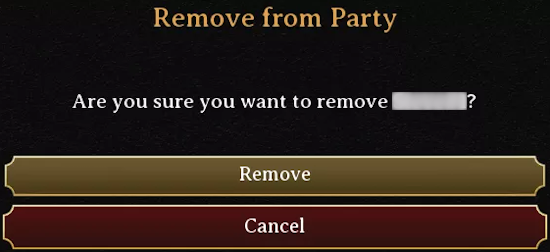
- Repeat the same process, but for “
Ban” to permanently remove them.
How to Unban Players on a Nightingale Server
If you need to give a player a second chance, you can unban them by editing the server’s ban list file.
- Head towards your server panel, then click “
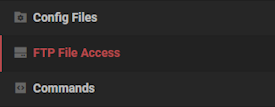
Stop” at the top. - On the left, click FTP File Access and login with your password.
- Navigate to this directory:
…/NWX/Saved/Config/LinuxServer - Press “
Edit” on the ServerState.ini file to open its contents.
- Proceed to locate the player you want unbanned on the “
Bans=” line.
- Highlight and delete the text inside the parentheses for that player.

- Click “
Save” at the top and return to the main panel, then startup the server.
How to Add a Password on a Nightingale Server
To make your server private for only you and your friends, setting a password is the best way to go.
- Head towards your server panel, then click Customizations on the left.
- Proceed to change the Server Password field to anything you want.

- Return to the main panel and restart the server to apply these changes.
- Join the server and enter the password to confirm it works.
How to Change the Difficulty on a Nightingale Server
You can adjust the challenge of your Nightingale server at any time by changing the difficulty setting.
- Head towards your server panel and click Customizations on the left.
- Click the Server Difficulty option, and select your desired difficulty level.

- Return to the main panel and restart the server to apply these changes.
How to Reset a Nightingale Server
If you want a fresh start, you can easily reset your server world. This will delete all progress and generate a new map.
- Head towards your server panel and click “
Stop” at the top. - Proceed to select FTP File Access on the left and login with your password.
- Navigate to the following directory:
…/NWX/Saved - Check mark the Offline & Config folders, then press “
Delete” at the top.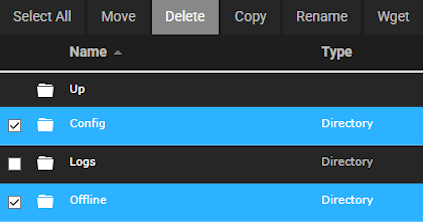
- Confirm these changes, then startup the server so it can generate a new world.
Conclusion
Managing your Nightingale server is a rewarding experience that gives you complete control over your world. From becoming an admin to customizing the difficulty, you have all the knowledge to create the perfect community. Whether you enable cheats to spawn items or reset the world, everything is at your fingertips. We hope this guide helps you build an amazing and lasting adventure in the Fae Realms!





















