

Overview
When playing on a Satisfactory server, playing with others in order to build the largest factories is a large part of multiplayer gameplay. In some cases, however, you may wish to make your Satisfactory server private to prevent most players from joining. This is beneficial if you wish to play by yourself or with a select amount of friends. In this case, setting a server password will prevent any unknown players from joining the server unless they are given the password. Knowing how to set a password in Satisfactory can be confusing for unfamiliar players, so we have created this Apex Hosting guide to ease you through the setup process.
Setting the Server Password
- Launch Satisfactory, then proceed to the
Server Managersection.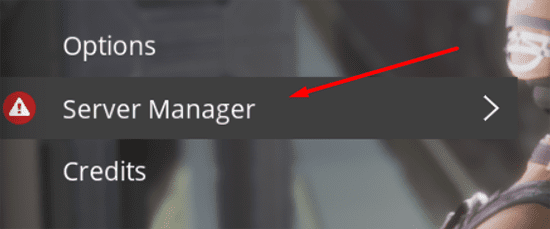
- Access your server menu, then enter the
Server Settingstab. - Locate
Player password protection, then pressChange Password.
- In the prompt window, enter and confirm the desired password.
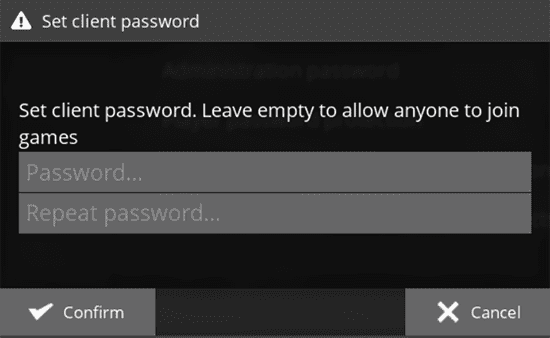
- Press
Confirmin order to set the desired client password. - Visit the Apex Server Panel, then restart your server for it to take effect.
Entering the Server Password
- Launch Satisfactory, then access the
Server Managersection. - Upon loading, you will be given a message to get authenticated.

- Press the
Authenticatebutton to open a prompt. - Enter the previous server password in the text field, then press
Confirm.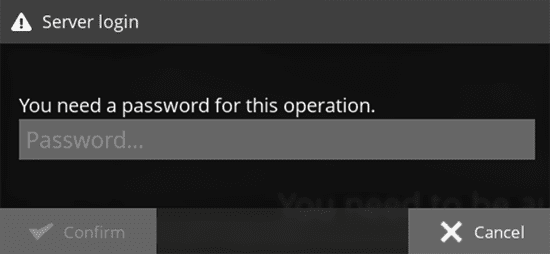
- If successful, you will now be able to view the server status and join.
Common Issues
I cannot press “Confirm” when choosing a password:
When this occurs, it means that the password entered in the second field does not match the first. Try to retype the second password once again, otherwise retype the password again from the beginning to ensure it is spelled the way you desire. Once they match, you can confirm the password and restart the server.
The server isn’t asking for a password:
Oftentimes, this occurs if the server has not properly saved the password or has not restarted. First, return to the Server Settings page and ensure your desired password is set and confirmed. Afterwards, visit the Apex Server Panel and press the Restart button. This will reload the server and require the password before joining.





















